Features
One workflow from books to reports
Work of a CA, auditor or finance team in one Windows desktop application, with AI that answers from the books.
- 225225ready reports
- 128128audit exception rules
- 2121CA tools + 4 document tools
- 88AI personas
Feature groups
Connect
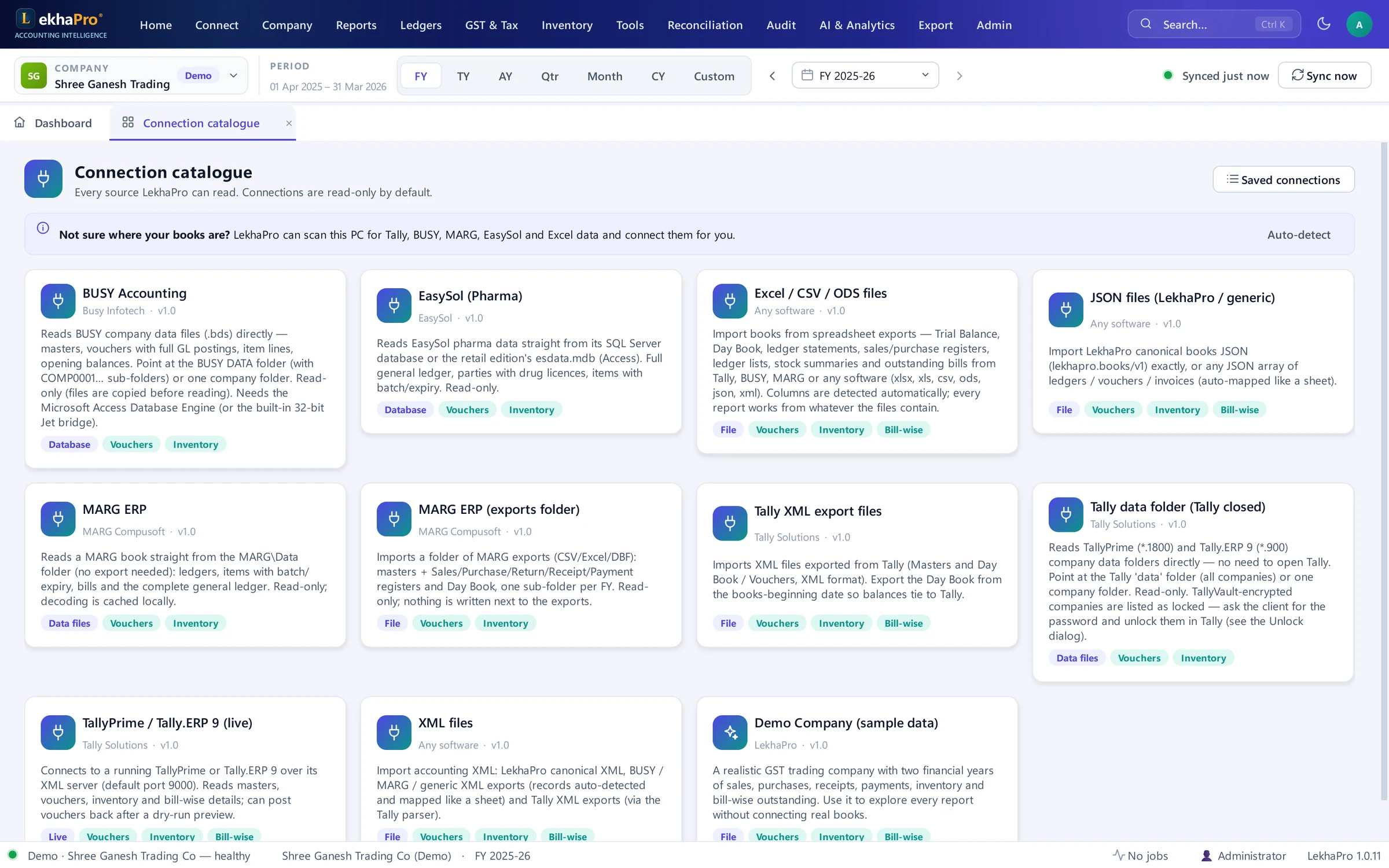
Auto-detect, live or file. Any company, any period.
- Finds accounting software and company data on this PC
- TallyPrime / Tally.ERP 9 live, or the data folder with Tally closed
- BUSY, MARG ERP and EasySol without exporting first
- Two-year trial balance import for any other software
- FY, AY, TY, quarter, month or custom range
Statements & Books
Schedule III, notes, designer and multi-year comparatives.
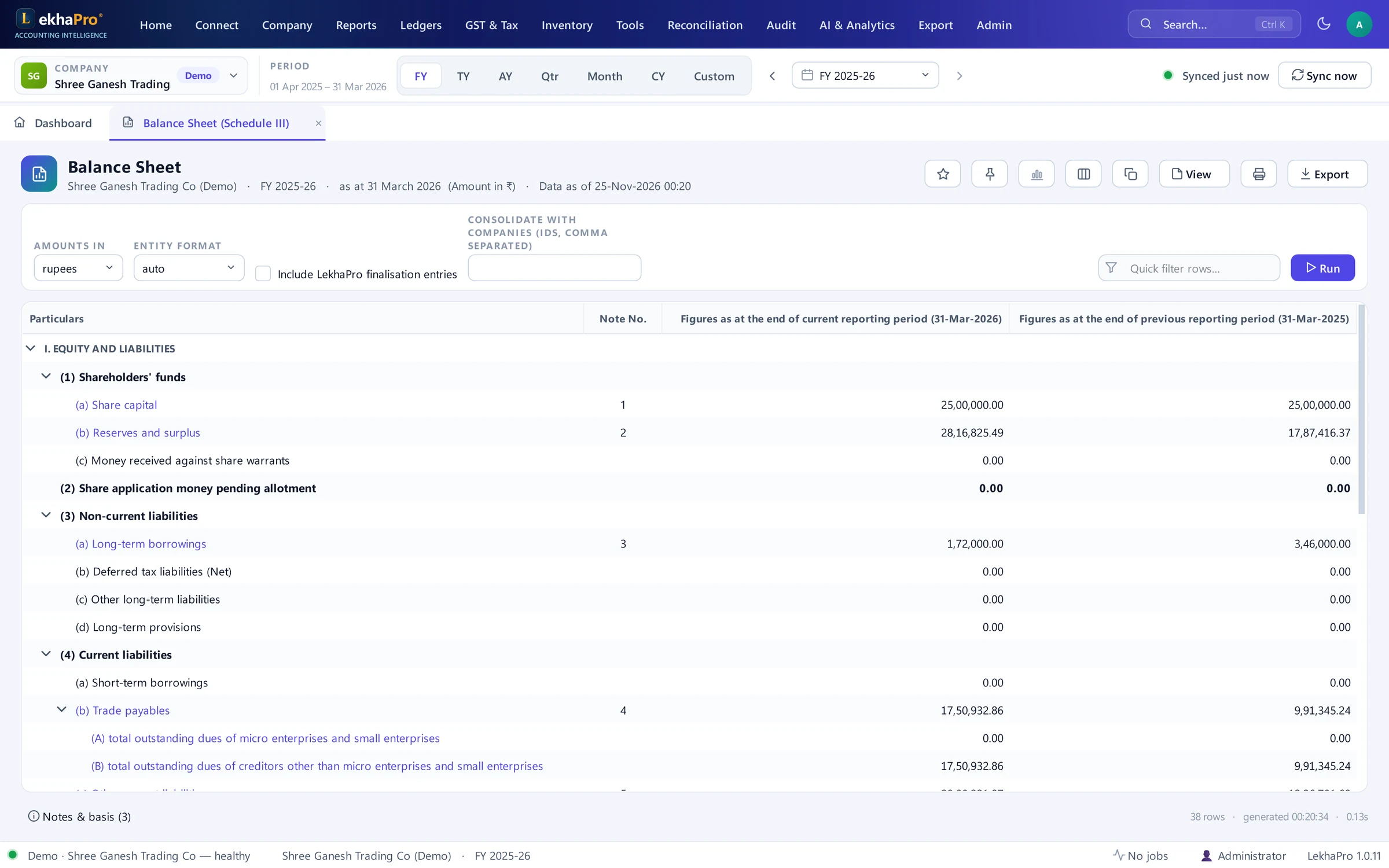
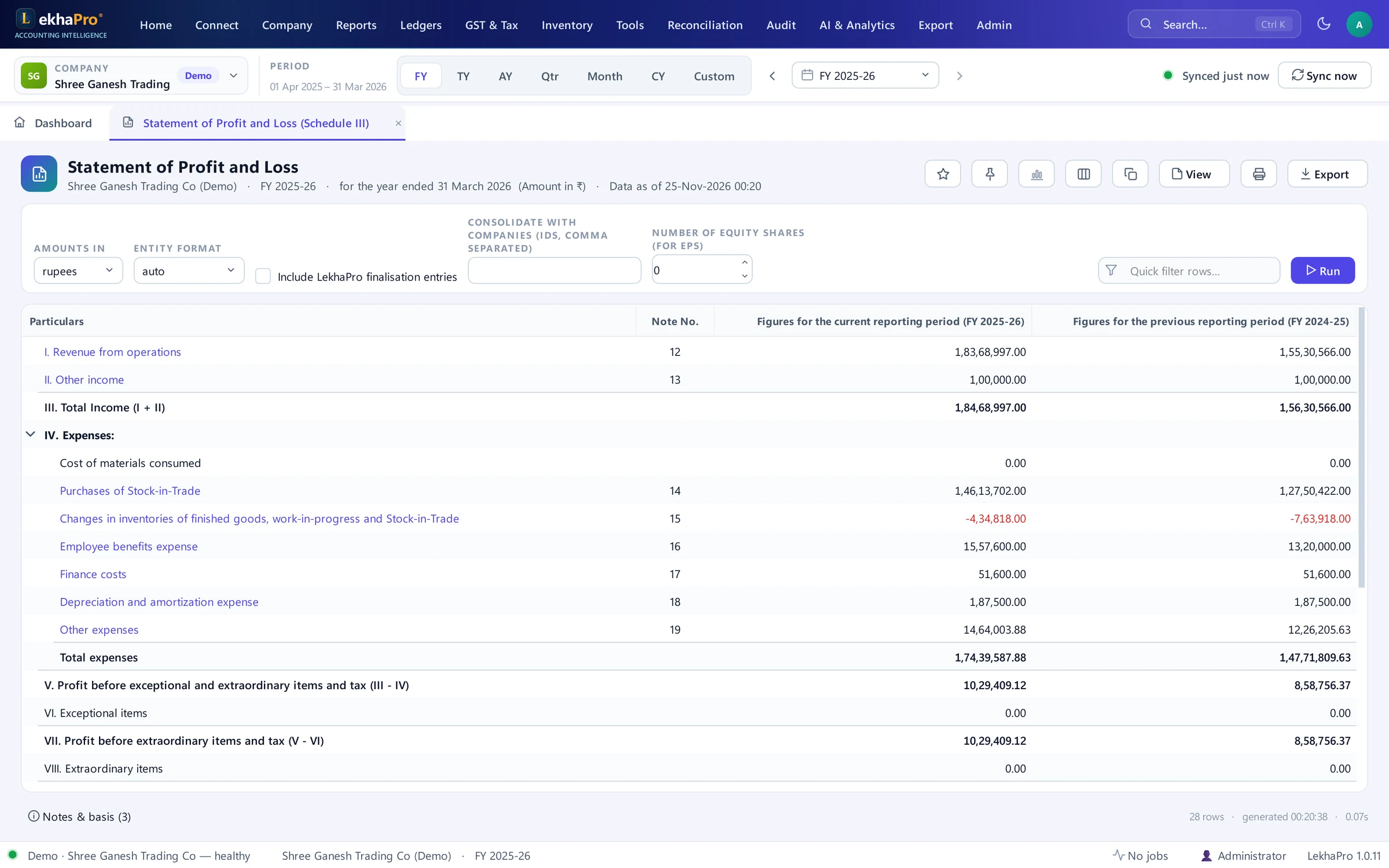
- Schedule III Balance Sheet and P&L with the previous year
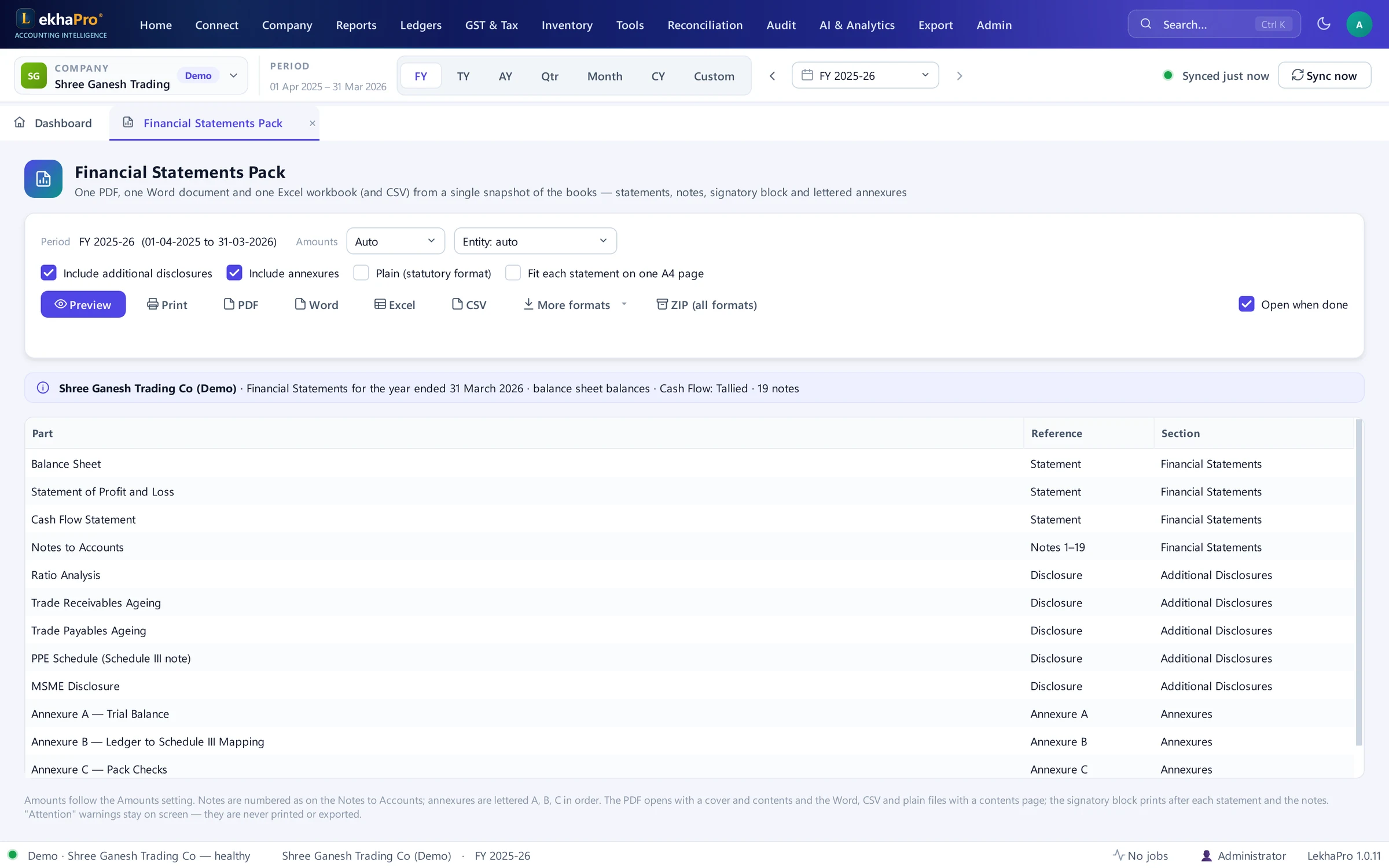
- Notes to accounts, ageing, MSME disclosure and ratios
- Cash flow (indirect and direct) and funds flow
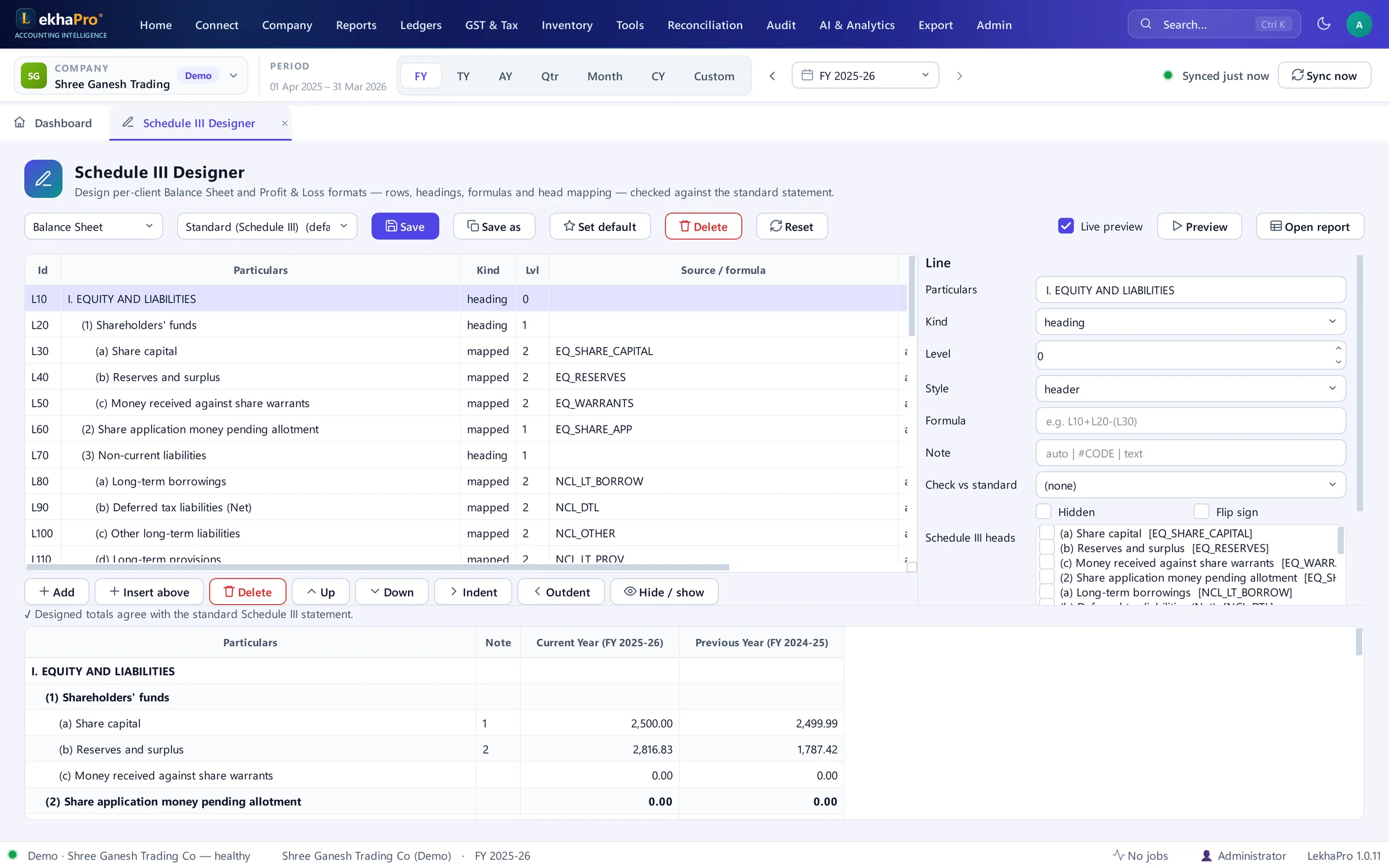
- Schedule III Designer with a live preview per client
- Multi-year analysis: trends, growth and ratios
GST & Portal Files
GSTR-1, 3B, 9, e-invoice, TDS and more, checked first.
- GSTR-1 portal JSON and Offline Tool Excel, GSTR-3B JSON
- GSTR-9 annual return and 9C worksheet
- E-invoice and e-way bill bulk files
- TDS 26Q / 24Q statement data, Form 3CD clause data, ITR Part A-BS / P&L
- AOC-4 draft, MSME Form-1 and compliance calendar
Reconciliation
Bank, GSTR-2A / 2B, IMS and GSTR-1.
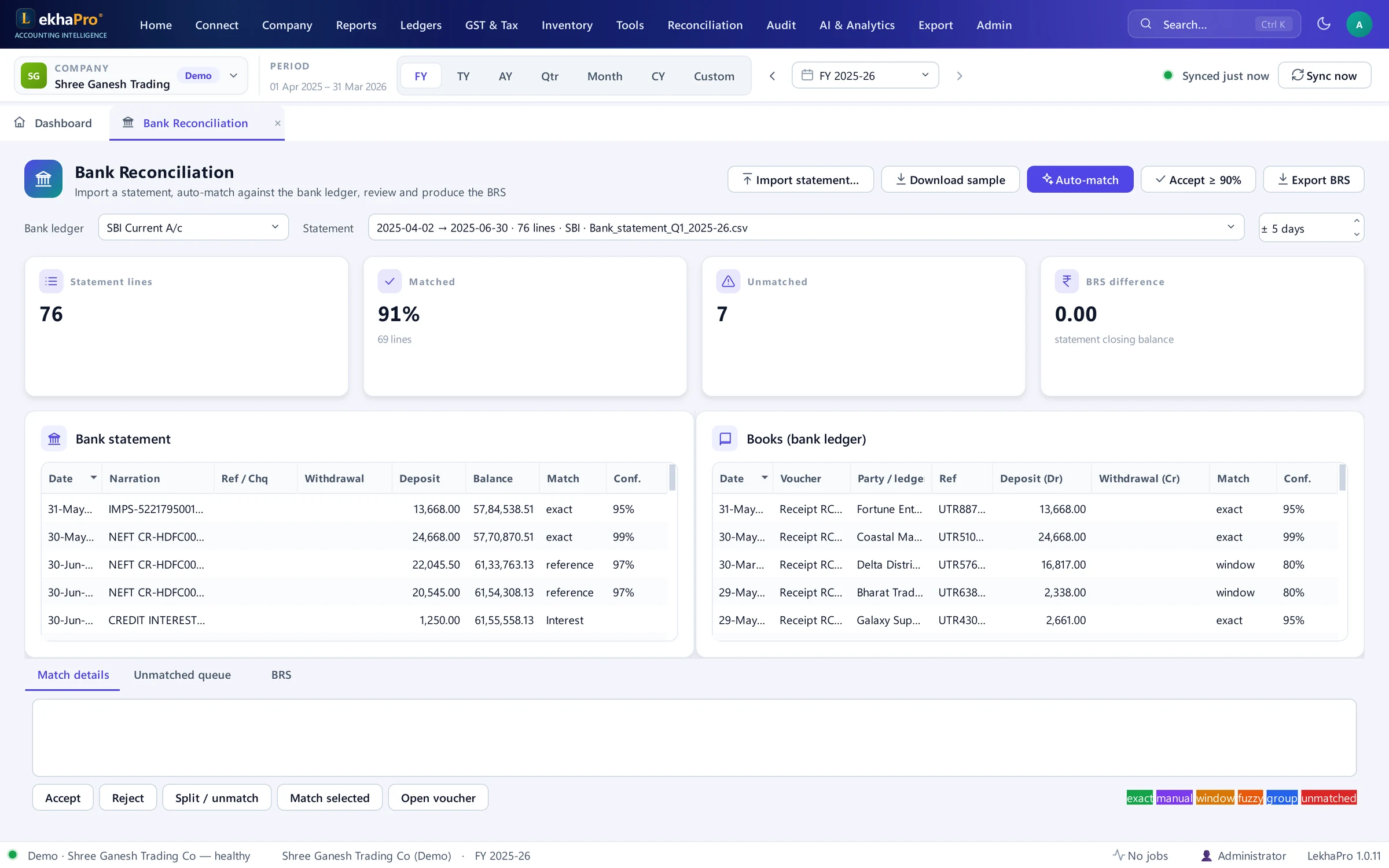
- Bank reconciliation with auto-match and BRS
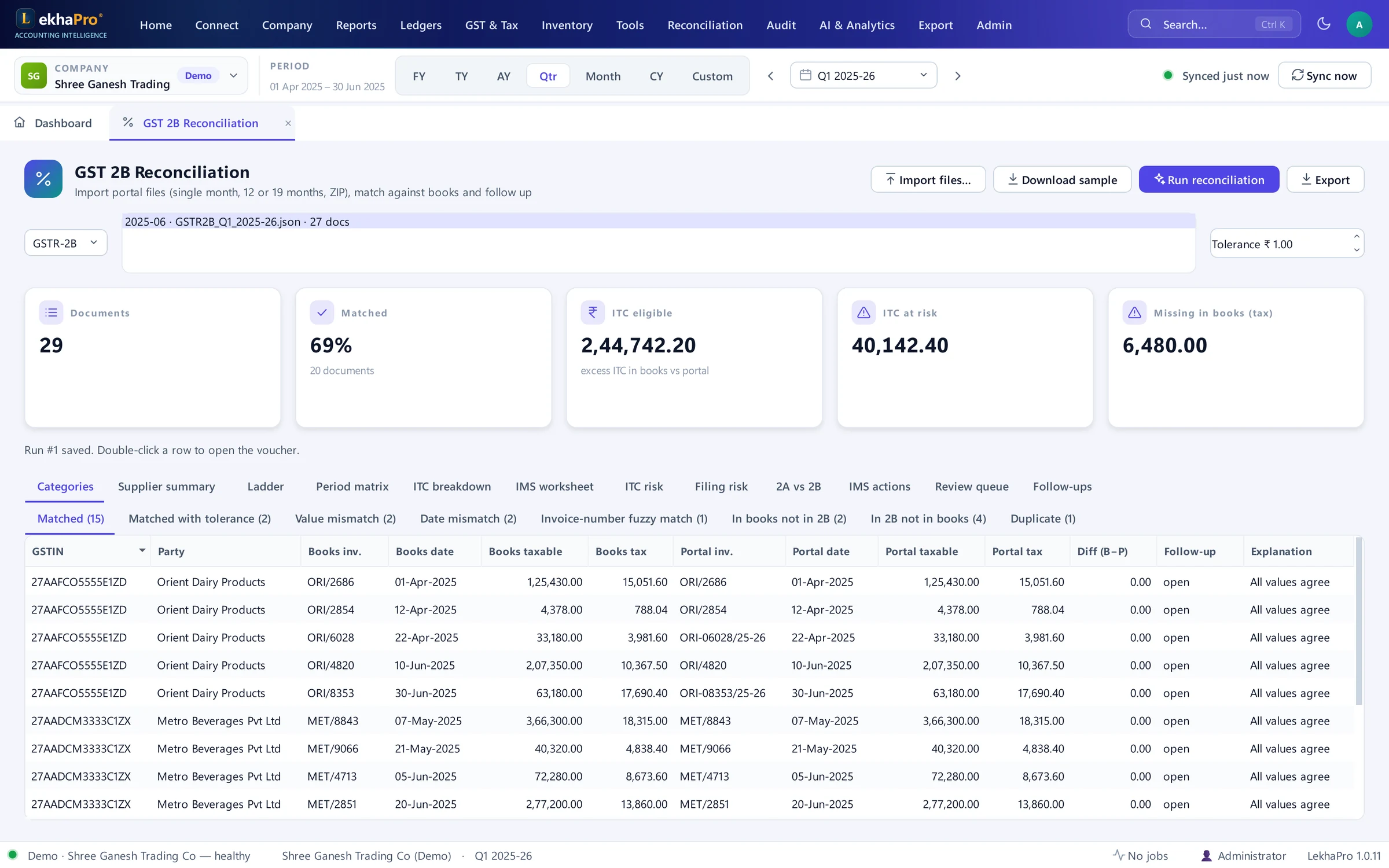
- Books vs GSTR-2B / 2A with fuzzy invoice numbers
- IMS worksheet: accept, reject or pending
- Filed GSTR-1 compared with the sales books
- ITC at risk and supplier follow-up letters
Year-end & Assets
Finalisation entries, fixed asset register and tax.
- Finalisation entries kept outside the source books, maker-checker with two or more users
- Year-end readiness checklist
- Fixed Asset Register reconciled to the ledger
- Companies Act and Income-tax depreciation
- Salary tax (old vs new regime), budgets and forecast
Audit
128 exception rules, sampling, CARO and engagements.
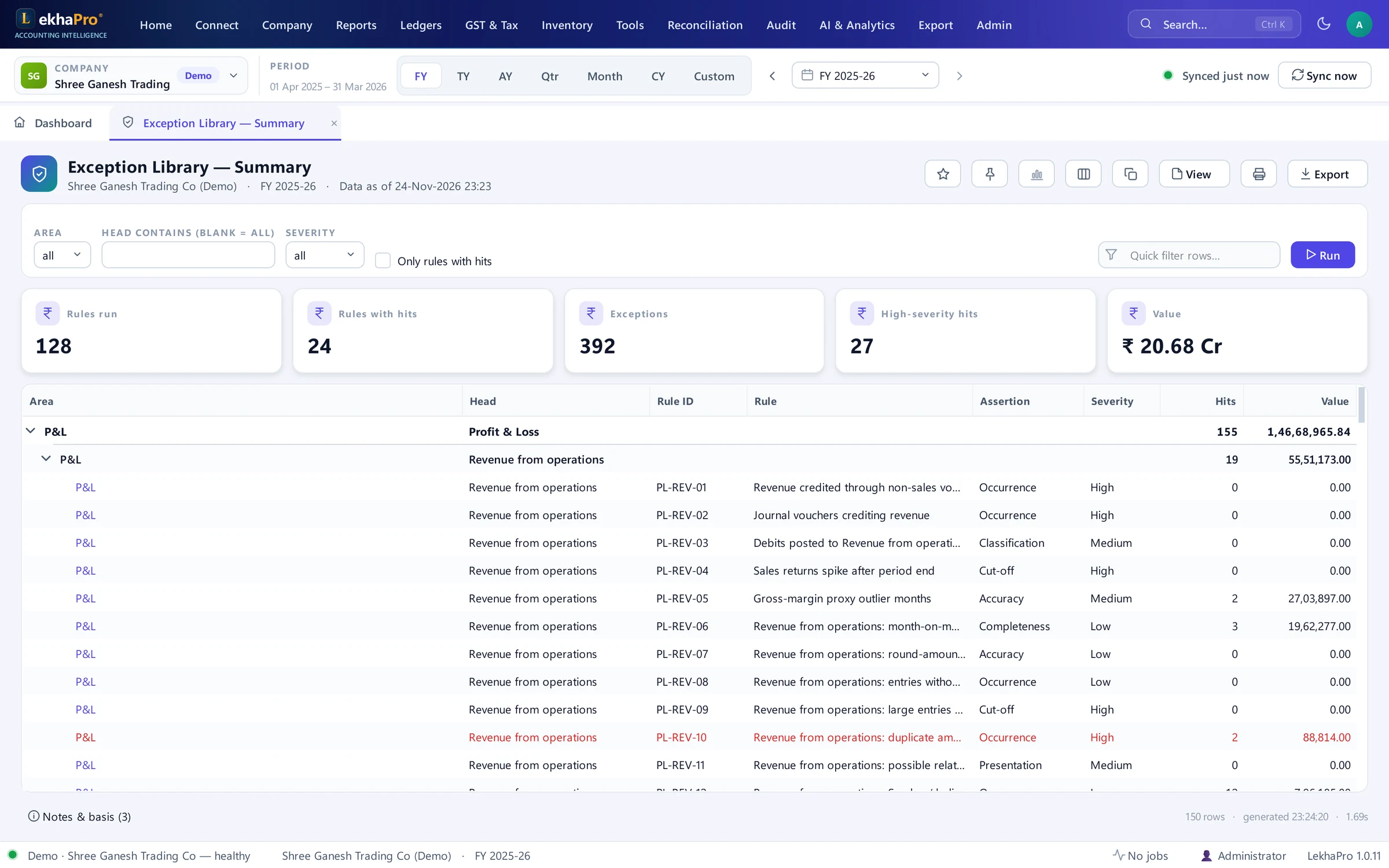
- Exception Library of 128 rules, tuned per company
- 40A(3), 269ST, duplicates, back-dated entries, Benford
- Sampling rules (SA 530) and differences (SA 450)
- CARO 2020 builder and observations register
- Anomaly Centre ranks unusual transactions
Documents & OCR
Bills to voucher drafts, read on your own PC.
- Offline OCR for invoices, bills and receipts
- GSTIN, invoice number, date, value and tax extracted
- Confidence score and position on the page
- Duplicate-bill check before booking
- Approved drafts to Tally XML or Excel
AI & Analytics
Ask your accounts, forecasts, MIS and Report Studio.
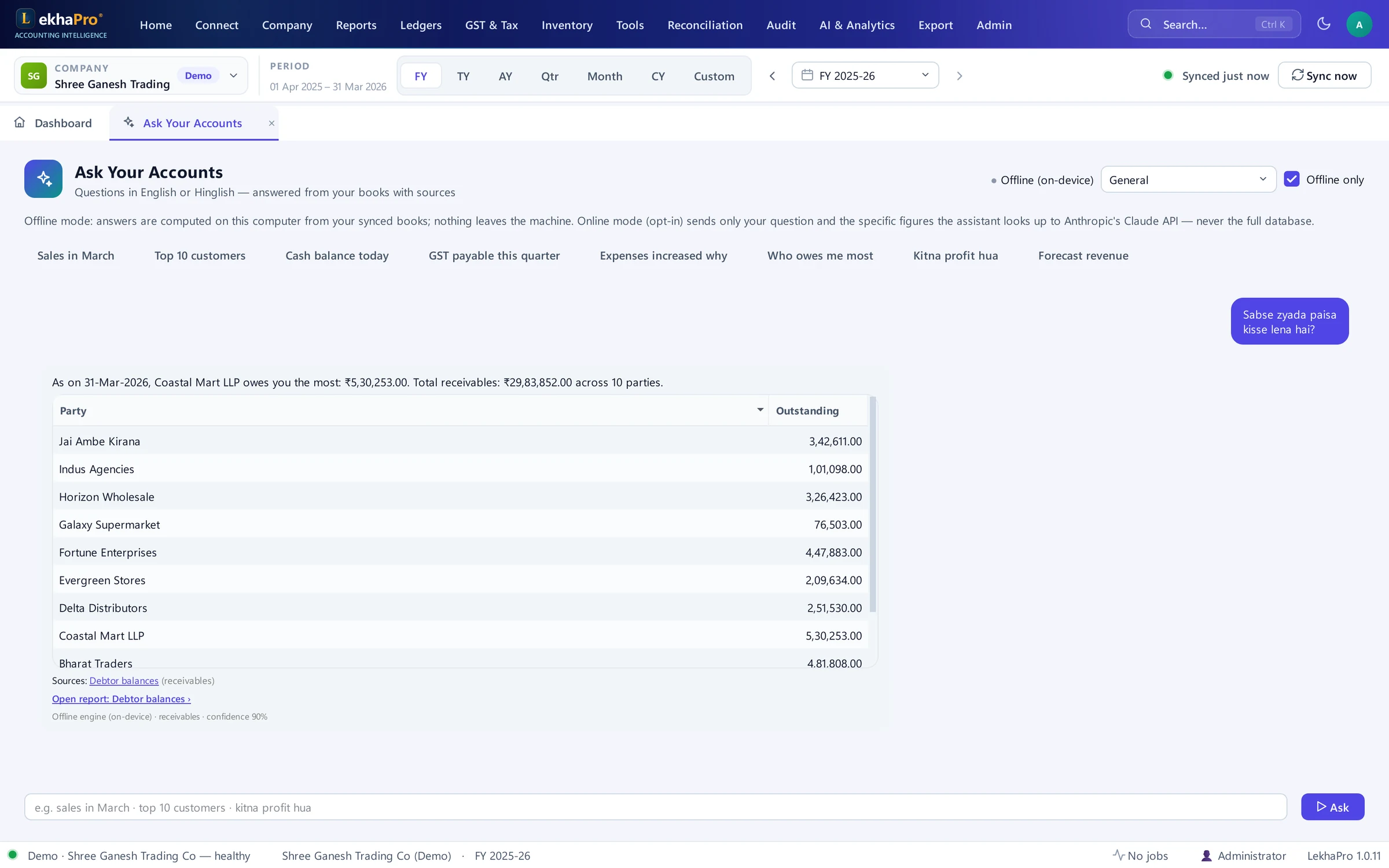
- Answers from the company's own books, with sources
- Eight personas, with full effect when online AI is on
- Daily briefing, forecasts and what-if scenarios
- Pivot tables and charts in Report Studio
- Built-in AI on your PC; online AI is optional and needs your consent and API key
CA Tools
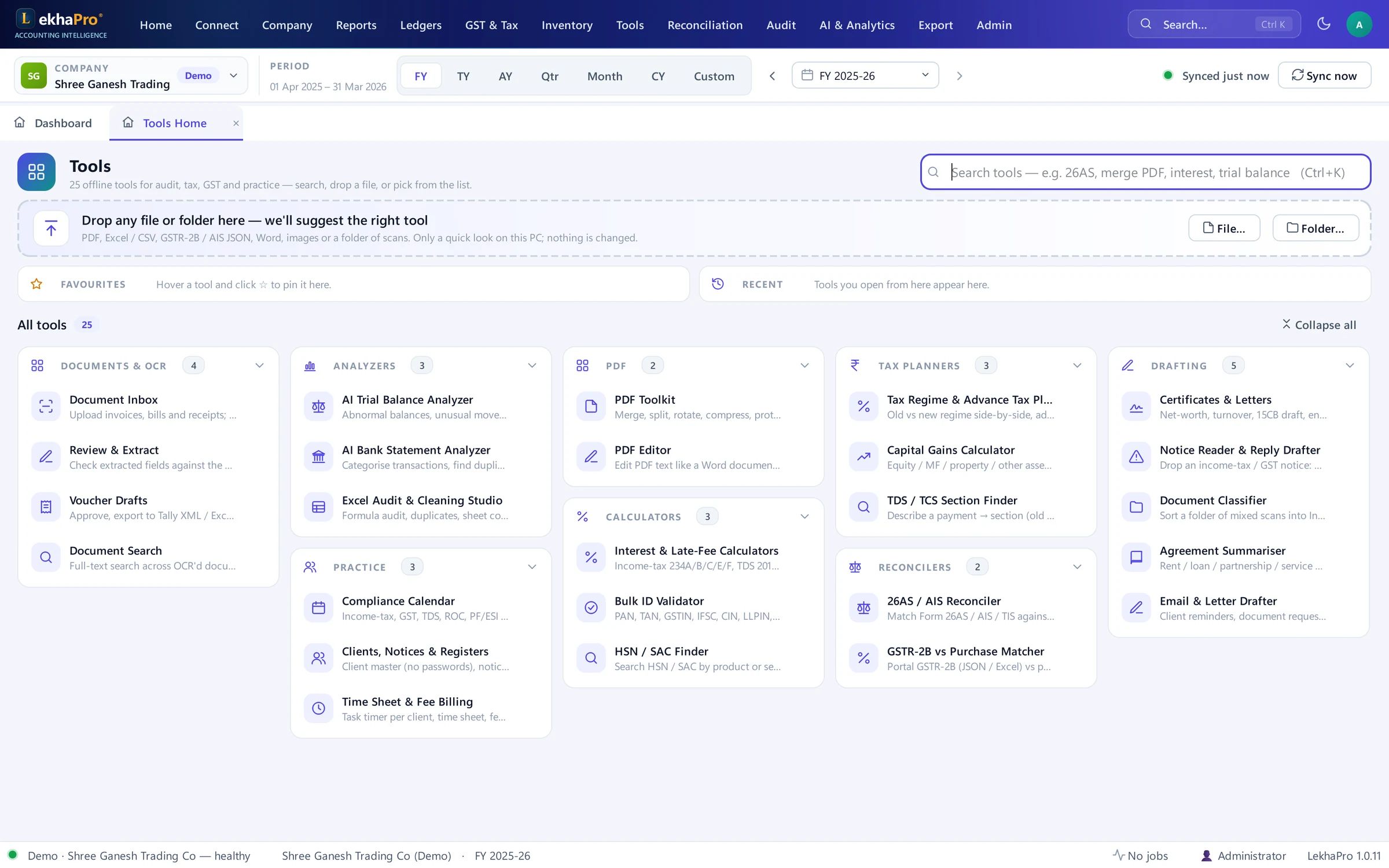
21 CA tools + 4 document tools.
- PDF toolkit and PDF editor
- Interest, late-fee and capital gains calculators
- 26AS / AIS and GSTR-2B matchers
- Notices, UDIN, DSC and fee billing registers
- Certificates, letters and agreement summaries
Reports
225 ready reports
No report to design and no template to set up. Pick the company and period and open any report.
225 reports
Financial Statements 27
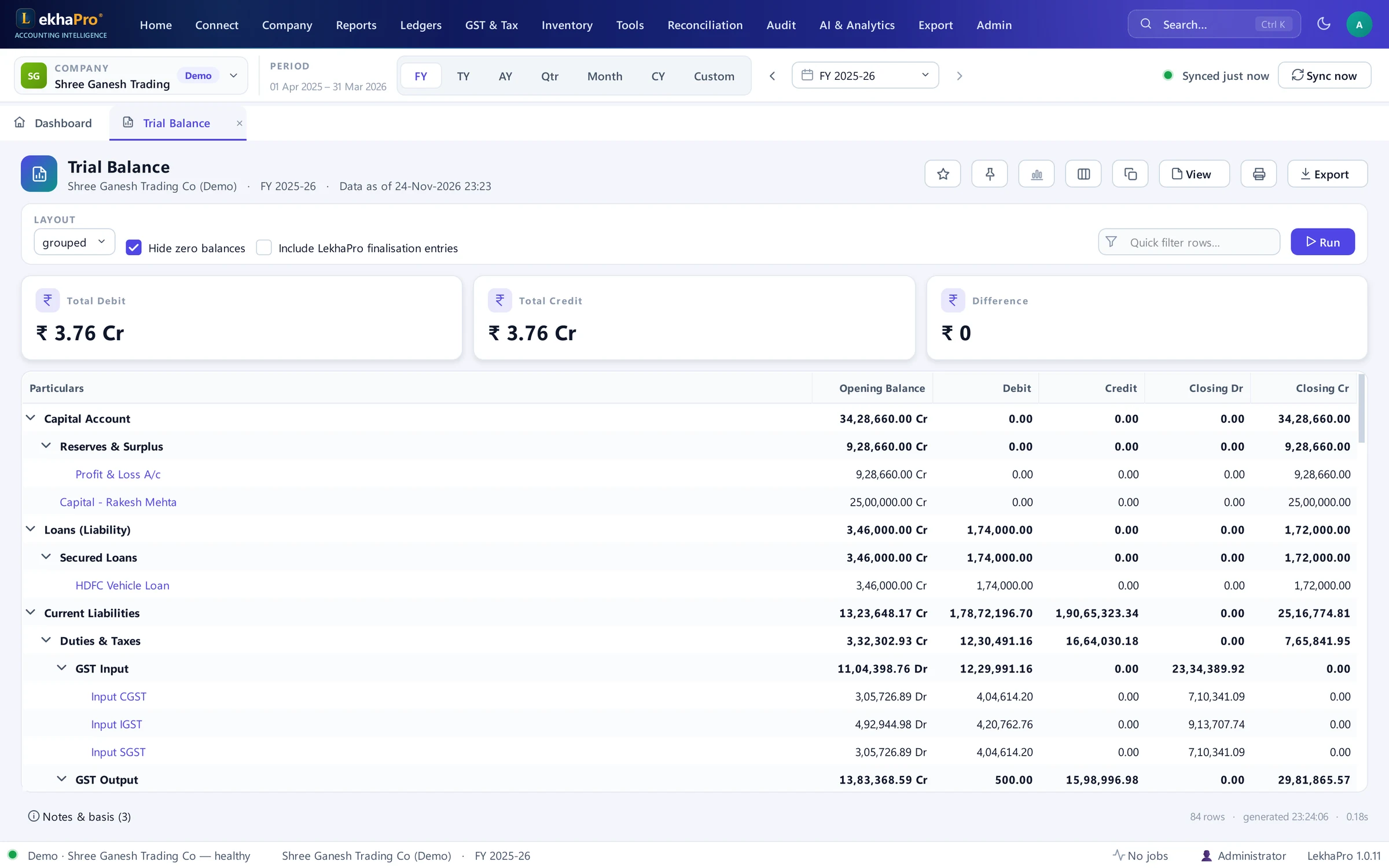
Trial Balance
Opening, period debit/credit and closing balances — grouped tree, flat ledger-wise or groups only, with a Dr = Cr check.
Adjusted Trial Balance
Source trial balance | LekhaPro finalisation adjustments | final trial balance.
Financial Statements Status
Dashboard indicators for finalisation: balance sheet tallied, cash flow tallied, trial balance difference, number of notes, unmapped ledgers, rounding suggestion, revenue and profit.
Balance Sheet
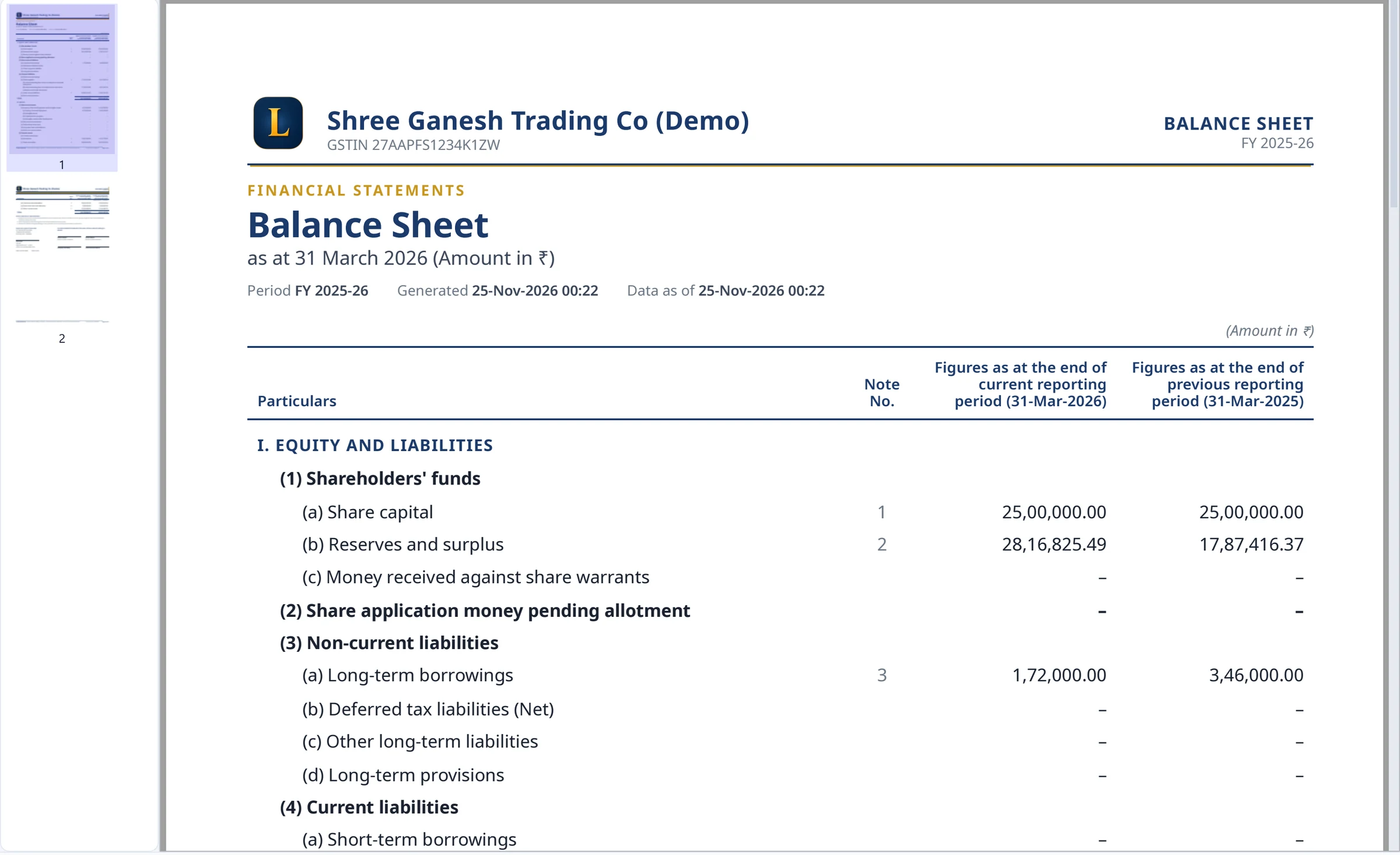
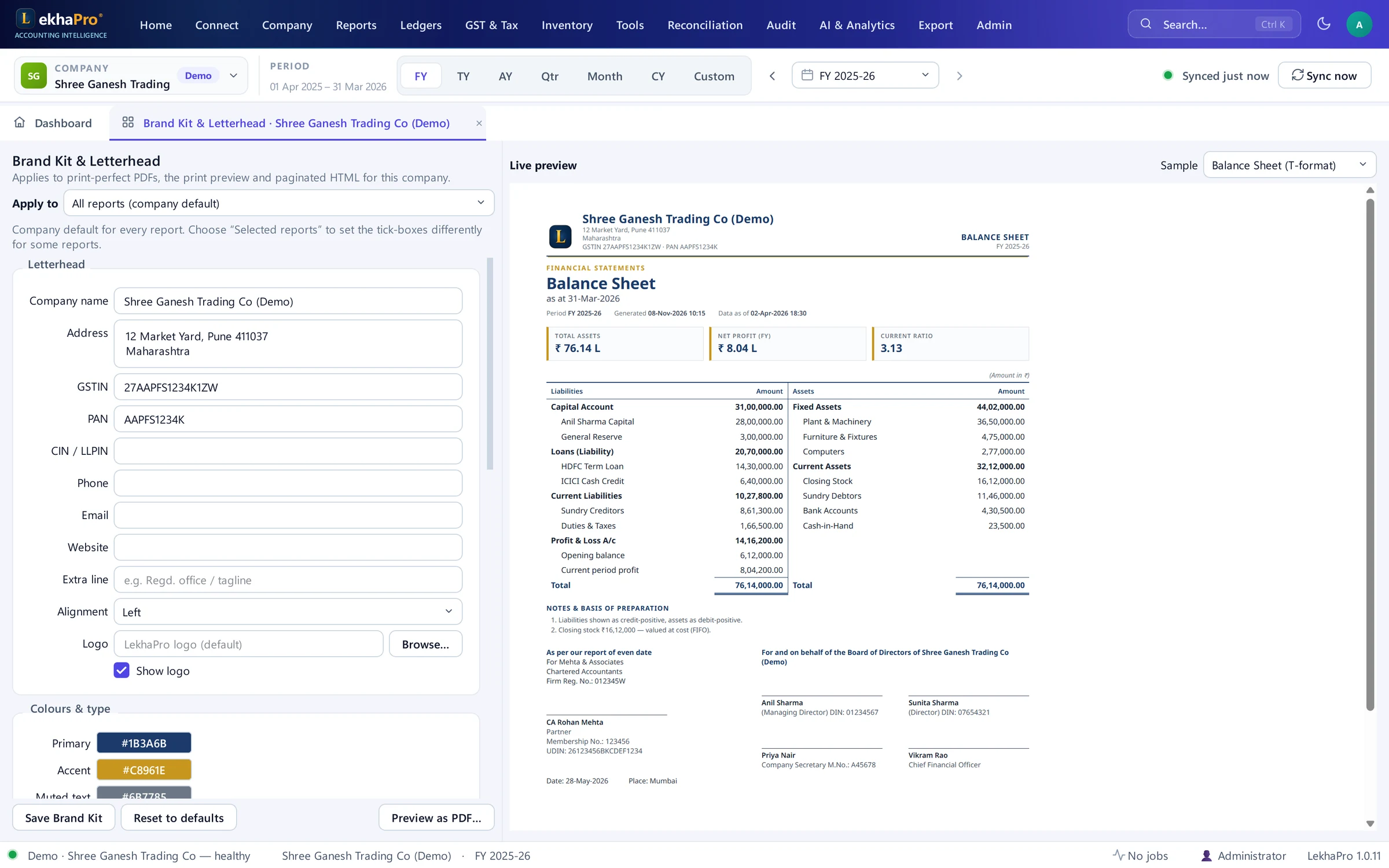
Balance Sheet as at period end — Tally-style Liabilities / Assets with closing stock and Profit & Loss A/c, or Schedule III vertical format.
Balance Sheet (Schedule III)
Part I — Balance Sheet in the Schedule III (Division I) vertical format with note references, comparatives and the authentication block (corporate or non-corporate format, rounding with footing, multi-branch aggregation).
Profit & Loss
Trading Account (gross profit with opening/closing stock) and Profit & Loss Account, or Schedule III Statement of Profit and Loss.
Statement of Profit and Loss (Schedule III)
Part II — Statement of Profit and Loss in the Schedule III format with EPS, comparatives and the authentication block.
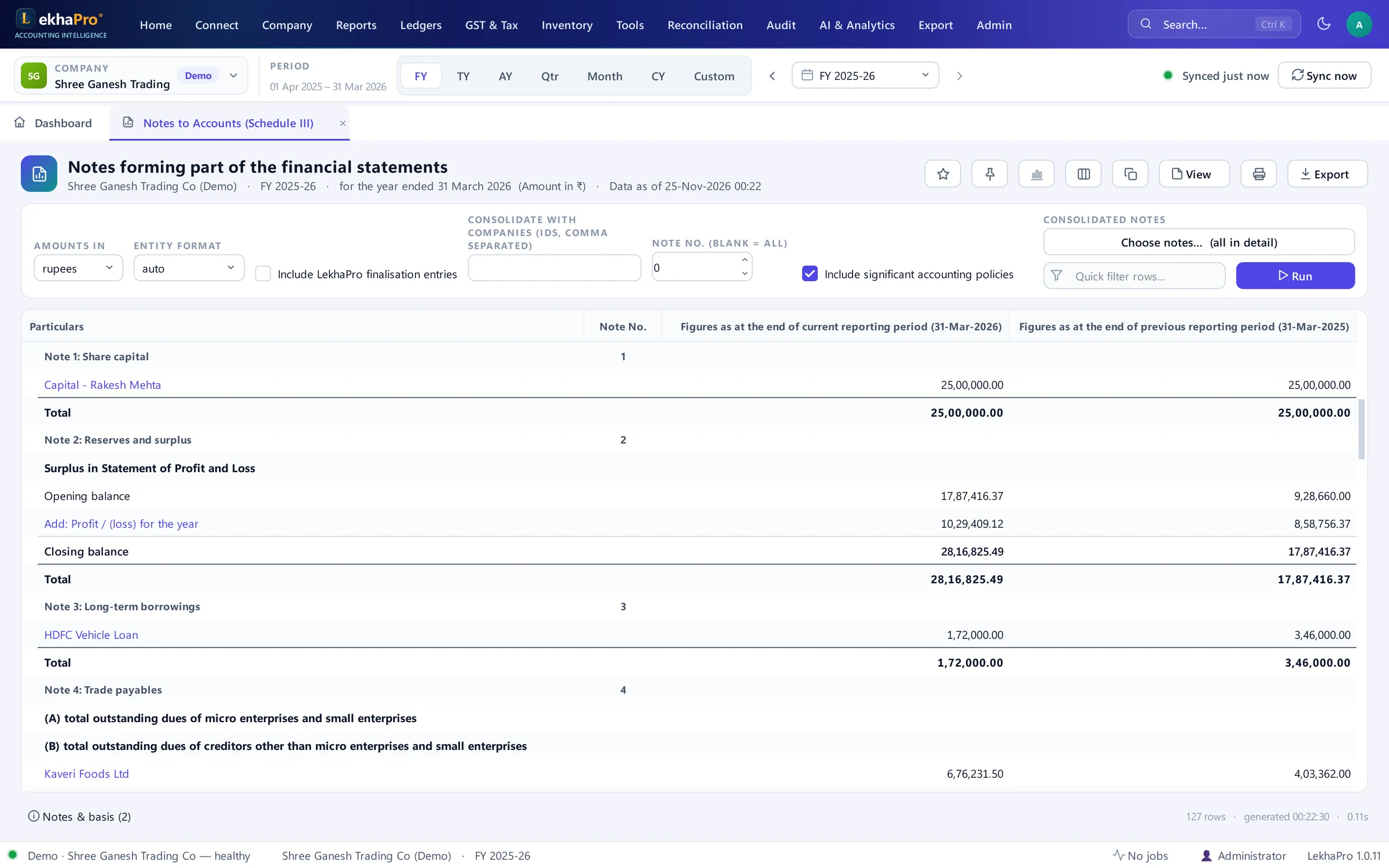
Notes to Accounts (Schedule III)
Notes forming part of the Schedule III financial statements — ledger composition of every line item for both years, surplus, inventories change and expense disclosures.
Trade Receivables Ageing (Schedule III)
Trade receivables ageing schedule per Schedule III (2021 amendment): <6m, 6m–1y, 1–2y, 2–3y, >3y; disputed / undisputed, good / doubtful.
Trade Payables Ageing (Schedule III)
Trade payables ageing schedule per Schedule III (2021 amendment): <1y, 1–2y, 2–3y, >3y; MSME / others, disputed dues.
Ratio Analysis (Schedule III)
Schedule III additional regulatory information — key ratios for current and previous year with % variance and explanation for changes above 25%.
Balance Sheet — Designed Layout
Schedule III Balance Sheet in a per-client layout (Reports › Schedule III Designer): add, hide, rename, regroup lines and formula totals, checked against the standard statement.
Ledger Mapping Review (Schedule III)
Every ledger with its Schedule III line, the reason (override / rule / group / heuristic) and reviewer warnings: credit-balance debtors, debit-balance creditors, overdrawn banks, loans defaulted to long-term, ungrouped ledgers, stale overrides.
Profit & Loss — Designed Layout
Schedule III Statement of Profit and Loss in a per-client layout with formula lines, checked against the standard statement.
Financials in ITR Format
Balance Sheet and P&L re-cast into ITR-3/5/6 Part A-BS / Part A-P&L heads (summary level).
Cash Flow Statement
Cash flow statement — indirect method (AS-3): operating, investing and financing activities reconciled to cash & bank balances.
Cash Flow Statement (Direct)
Direct-method cash flow: actual cash & bank receipts and payments classified by the counter-ledger (customers, suppliers, employees, taxes, capex, loans, capital).
Funds Flow Statement
Schedule of changes in working capital and statement of sources and application of funds.
Group Summary
Sub-groups and ledgers of one group with opening, debit, credit and closing.
Comparative Balance Sheet
Balance Sheet at period end vs the comparable previous period end, with variance and %.
Comparative Profit & Loss
Profit & Loss for the period vs the comparable previous period, with variance and %.
Multi-period Comparative Statements
P&L or Balance Sheet side by side for several periods — monthly, quarterly or year-wise (N years).
Capital Accounts (Partners / Proprietor)
Each capital account from the books: opening, capital introduced, interest / remuneration credited (classified by the expense ledger debited), profit already transferred in the books, other credits, drawings and closing. Profit still in the P&L A/c is allocated only in a profit-sharing ratio you enter.
Monthly Profit & Loss
Profit & Loss with one column per month of the period (stock-adjusted gross & net profit).
Finalisation Entries Register
Year-end adjusting / regrouping entries made in LekhaPro (not in source books), with approval status.
Depreciation as per Companies Act
Schedule II depreciation by asset with rate, days used and WDV.
PPE Schedule (Schedule III note)
Property, plant & equipment note: gross block, accumulated depreciation and net block (CY / PY).
Books & Registers 25
Day Book
Every voucher in the period in date order.
Ledger Statement
Ledger account with opening balance, running balance, contra ledger, narration and drill to voucher.
Cash Book
All Cash-in-Hand ledgers combined with running balance.
Bank Book
Bank ledger statement (one bank or all banks).
Bank Account Summary
Each bank / cash account: opening, receipts, payments, closing and monthly movement.
Cheque / Instrument Register
Bank receipts and payments with instrument / reference numbers.
Bank Master Report
Every bank transaction with party, mode, instrument, reference, cheque clearing status (from Bank Reconciliation), cost centre, receipt / payment and running balance; filterable.
Daily Bank & Cash Summary
Day-wise receipts, payments and closing balance of all cash & bank accounts.
Bank Monthly Summary
Month-wise opening, receipts, payments, net movement and closing balance — one bank or all banks.
Voucher Register
Vouchers filtered by voucher type.
Journal Register
Journal vouchers with their debit and credit lines.
Receipt Register
Receipt vouchers with mode (Cash / Bank / UPI / Cheque), instrument, bank / cash account and bills settled.
Payment Register
Payment vouchers with mode (Cash / Bank / UPI / Cheque), instrument, bank / cash account and bills settled.
Group Vouchers
All vouchers touching ledgers of a group (Tally 'Group Vouchers').
Sales Register
Sales vouchers with customer GSTIN, place of supply, order, e-way bill, IRN, taxable value, GST split, round-off and grand total.
Purchase Register
Purchase vouchers with supplier GSTIN, place of supply, order, e-way bill, IRN, taxable value, GST split, round-off and grand total.
Credit / Debit Note Register
Credit notes (sales returns) and debit notes (purchase returns) with GST split.
Sales by Voucher Type
Sales, returns and other voucher types summarised by month.
Expense Register
Expense vouchers line-wise: expense head, vendor, taxable value, GST (ITC), total and an ITC eligibility screen for blocked credits u/s 17(5).
Payment Advice
Supplier payments in the period with the bills settled (for remittance advice).
Cost Centre Summary
Income and expenses by cost centre (when the source records cost centres).
Voucher Detail
One voucher with header, ledger entries and inventory lines (drill target).
Fixed Asset Register
Asset-wise register: gross block, Schedule II depreciation, accumulated depreciation, net block, profit/(loss) on sale.
Voucher Edit History (Alterations)
Vouchers altered after entry, from Tally AlterID / MasterID: altered after later vouchers were entered, and altered / entered after their month was closed.
Bank Reconciliation Statement
Balance as per books reconciled to balance as per bank: unpresented cheques, uncleared deposits and bank-only entries, with the difference.
Receivables & Payables 17
Receivables Outstanding
Bill-wise outstanding receivables by customer (source bills or FIFO from ledgers).
Payables Outstanding
Bill-wise outstanding payables by supplier (source bills or FIFO from ledgers).
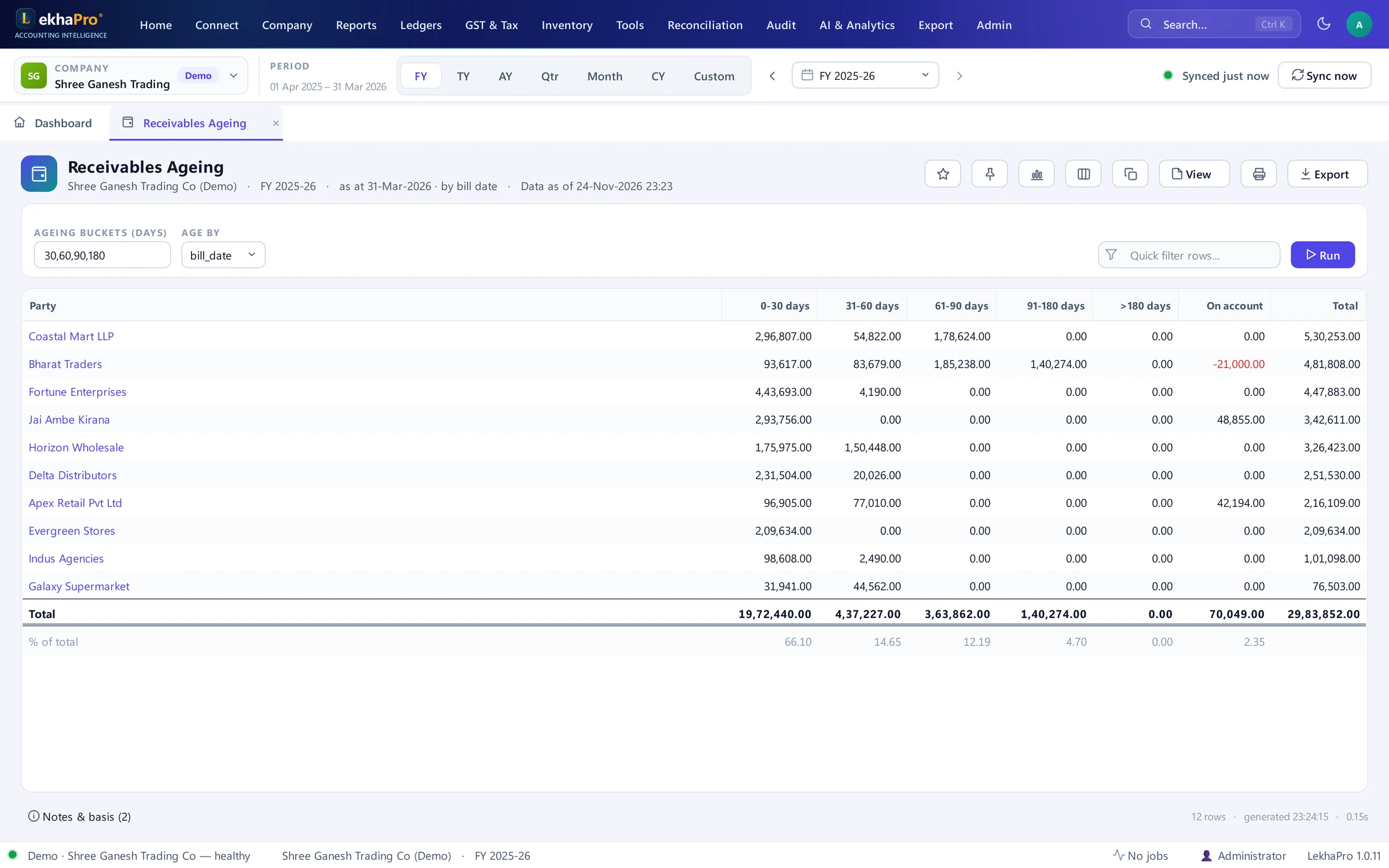
Ageing Analysis
Receivables or payables ageing in configurable buckets by bill date or due date.
Receivables Ageing
Customer ageing buckets.
Payables Ageing
Supplier ageing buckets.
Due List
Bills falling due (or overdue) up to N days after period end — follow-up list.
Overdue Bills
Bill-wise overdue list: days overdue counted from the DUE date, bill amount and unpaid balance, receivable or payable side.
Party Ledger Summary
Every customer and supplier: opening, debits, credits, closing, sales/purchases.
Party Account Statement
One customer / supplier: summary KPIs, ledger with running balance, open bills with ageing.
Parties Not Paid Since
Customers (or suppliers) with an outstanding balance and no receipt (payment) for N days.
Customer Risk Score
Customer intelligence: Pareto tier, a 0-100 health score (payment days, overdue %, revenue trend, concentration), revenue, orders, average order, last order, receivable and risk.
Customer Churn Risk
Active / At risk / Lost customers from their own buying rhythm: orders, median days between orders, last order, lifetime value and revenue at risk.
Collection Trend
Monthly billing vs collections from customers, with collection efficiency and DSO.
Collection Effectiveness Index
CEI = (opening receivables + billing − closing receivables) / (opening receivables + billing − current receivables) per month, with DSO trend.
Overdue Interest
Simple interest on overdue customer bills from due date to period end (declining balance per bill).
MSME Interest (s.16) & s.43B(h)
Bills of micro / small suppliers (books' MSME registration or Statutory Settings mark) unpaid beyond the s.15 time limit (agreed credit period from the books, max 45 days; 15 days without agreement): compound interest u/s 16 at 3 x the RBI bank rate with monthly rests, and the s.43B(h) amount.
MSME Disclosure (Schedule III)
Disclosure under MSMED Act s.22: (a) principal & interest unpaid, (b) interest paid u/s 16, (c) interest due for delayed payments, (d) interest accrued & unpaid, (e) further interest.
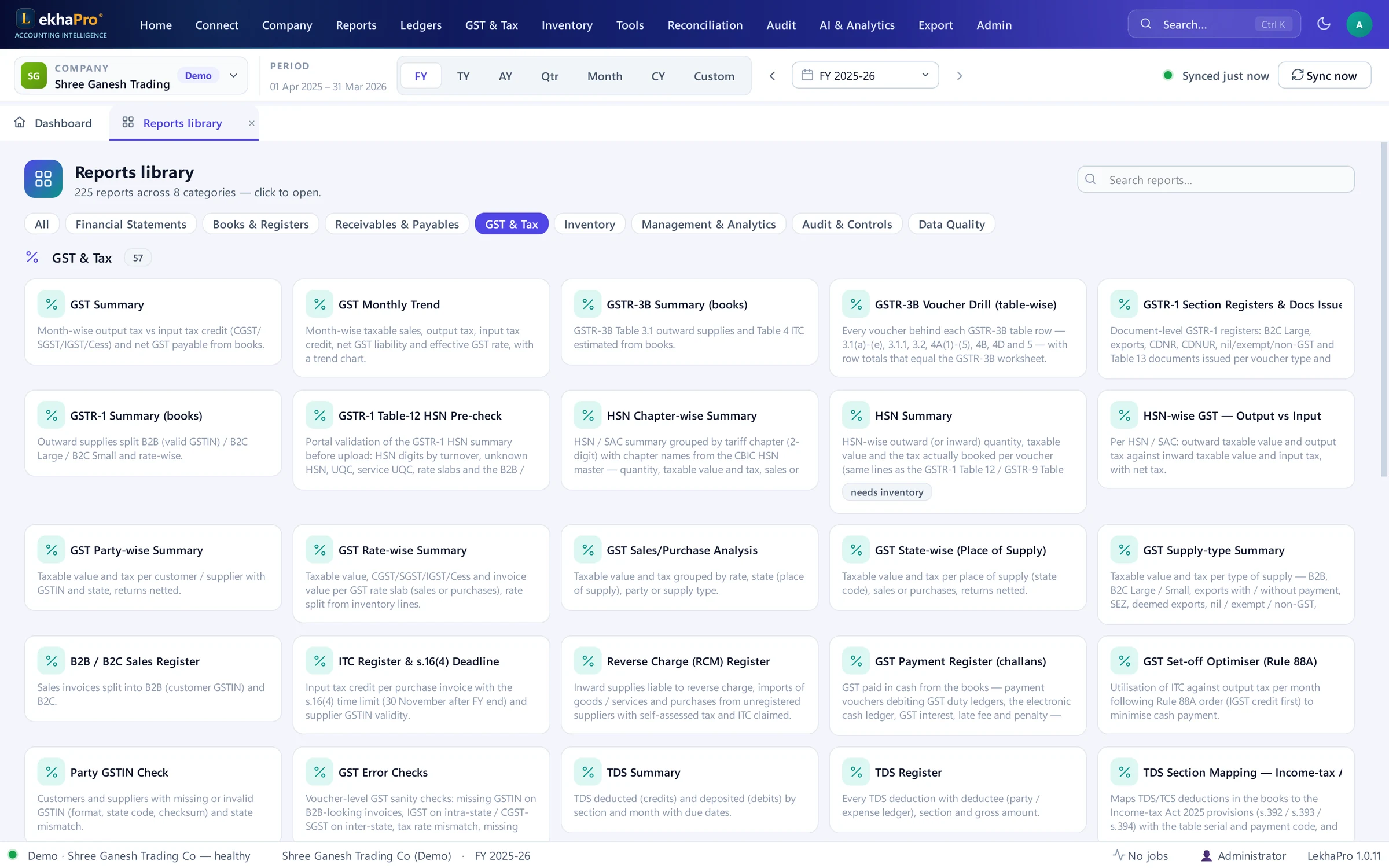
GST & Tax 57
GST Summary
Month-wise output tax vs input tax credit (CGST/SGST/IGST/Cess) and net GST payable from books.
GST Monthly Trend
Month-wise taxable sales, output tax, input tax credit, net GST liability and effective GST rate, with a trend chart.
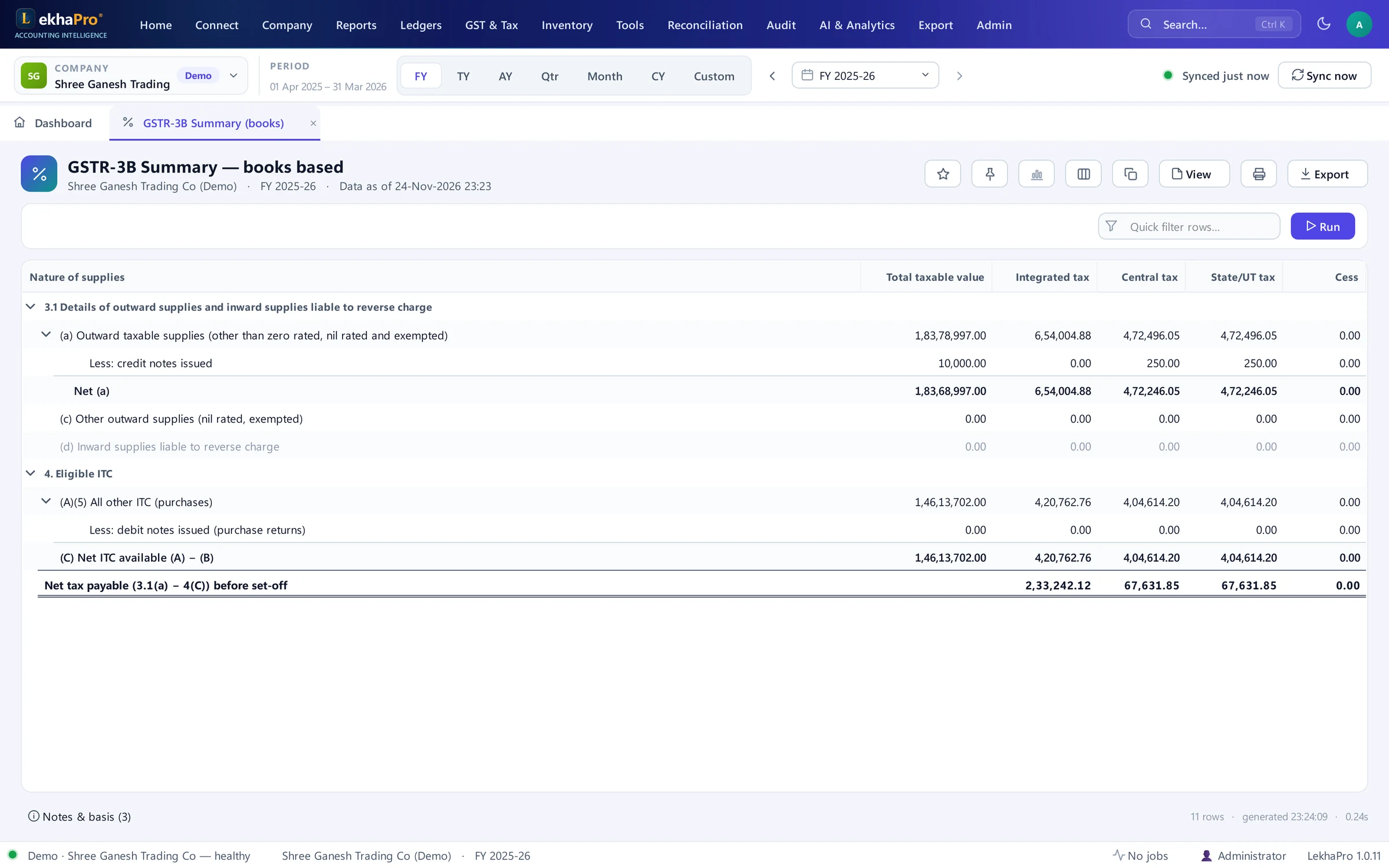
GSTR-3B Summary (books)
GSTR-3B Table 3.1 outward supplies and Table 4 ITC estimated from books.
GSTR-3B Voucher Drill (table-wise)
Every voucher behind each GSTR-3B table row — 3.1(a)-(e), 3.1.1, 3.2, 4A(1)-(5), 4B, 4D and 5 — with row totals that equal the GSTR-3B worksheet.
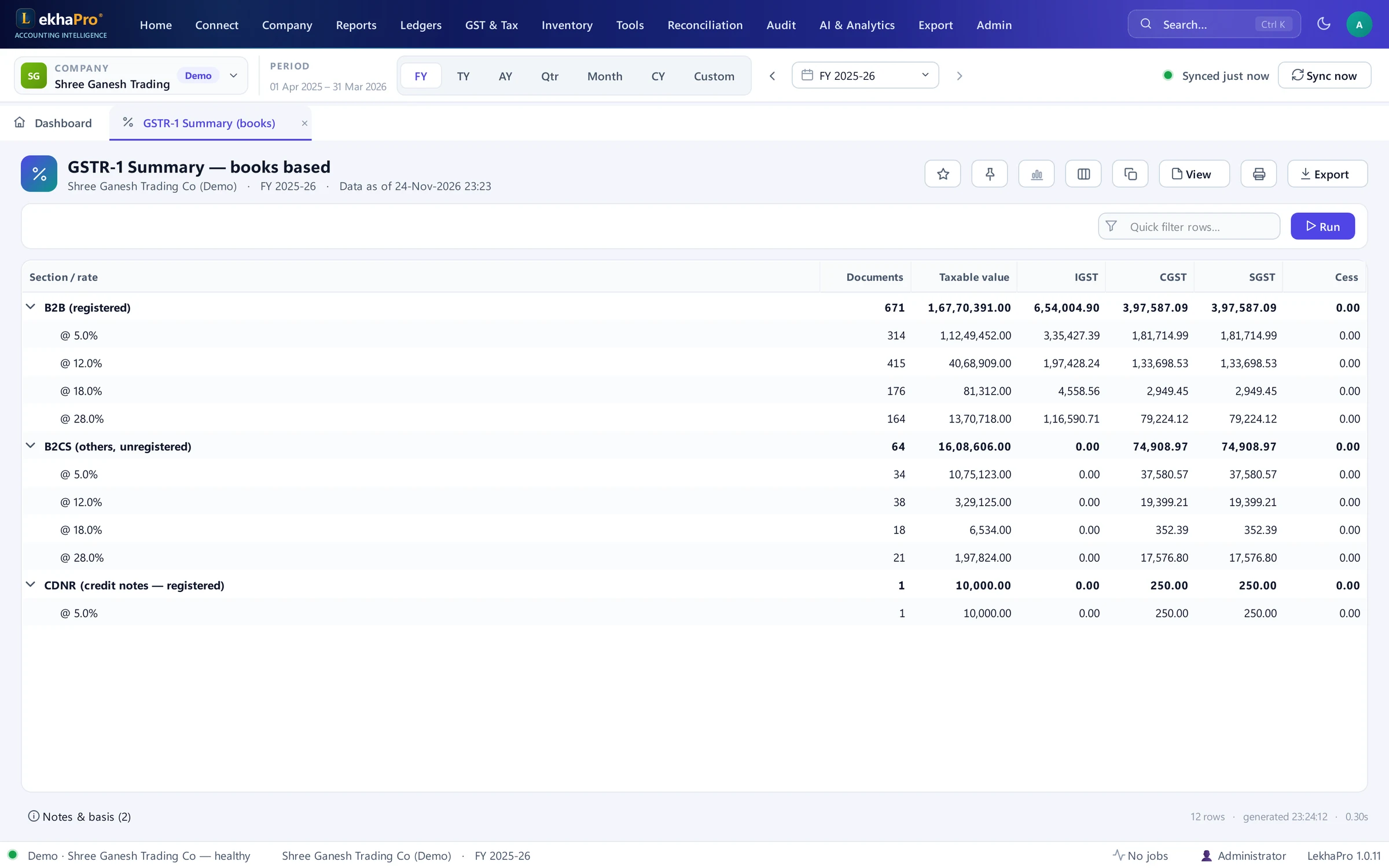
GSTR-1 Summary (books)
Outward supplies split B2B (valid GSTIN) / B2C Large / B2C Small and rate-wise.
GSTR-1 Section Registers & Docs Issued
Document-level GSTR-1 registers: B2C Large, exports, CDNR, CDNUR, nil/exempt/non-GST and Table 13 documents issued per voucher type and number series.
HSN Summary
HSN-wise outward (or inward) quantity, taxable value and the tax actually booked per voucher (same lines as the GSTR-1 Table 12 / GSTR-9 Table 17-18 HSN summary).
HSN Chapter-wise Summary
HSN / SAC summary grouped by tariff chapter (2-digit) with chapter names from the CBIC HSN master — quantity, taxable value and tax, sales or purchases, returns netted.
HSN-wise GST — Output vs Input
Per HSN / SAC: outward taxable value and output tax against inward taxable value and input tax, with net tax.
GSTR-1 Table-12 HSN Pre-check
Portal validation of the GSTR-1 HSN summary before upload: HSN digits by turnover, unknown HSN, UQC, service UQC, rate slabs and the B2B / B2C split against the invoice tables.
GST Sales/Purchase Analysis
Taxable value and tax grouped by rate, state (place of supply), party or supply type.
GST Rate-wise Summary
Taxable value, CGST/SGST/IGST/Cess and invoice value per GST rate slab (sales or purchases), rate split from inventory lines.
GST State-wise (Place of Supply)
Taxable value and tax per place of supply (state code), sales or purchases, returns netted.
GST Party-wise Summary
Taxable value and tax per customer / supplier with GSTIN and state, returns netted.
GST Supply-type Summary
Taxable value and tax per type of supply — B2B, B2C Large / Small, exports with / without payment, SEZ, deemed exports, nil / exempt / non-GST, imports and reverse-charge inward supplies.
B2B / B2C Sales Register
Sales invoices split into B2B (customer GSTIN) and B2C.
ITC Register & s.16(4) Deadline
Input tax credit per purchase invoice with the s.16(4) time limit (30 November after FY end) and supplier GSTIN validity.
Reverse Charge (RCM) Register
Inward supplies liable to reverse charge, imports of goods / services and purchases from unregistered suppliers with self-assessed tax and ITC claimed.
GST Set-off Optimiser (Rule 88A)
Utilisation of ITC against output tax per month following Rule 88A order (IGST credit first) to minimise cash payment.
GST Payment Register (challans)
GST paid in cash from the books — payment vouchers debiting GST duty ledgers, the electronic cash ledger, GST interest, late fee and penalty — with the tax period and challan (CPIN / CIN).
Party GSTIN Check
Customers and suppliers with missing or invalid GSTIN (format, state code, checksum) and state mismatch.
GST Error Checks
Voucher-level GST sanity checks: missing GSTIN on B2B-looking invoices, IGST on intra-state / CGST-SGST on inter-state, tax rate mismatch, missing HSN.
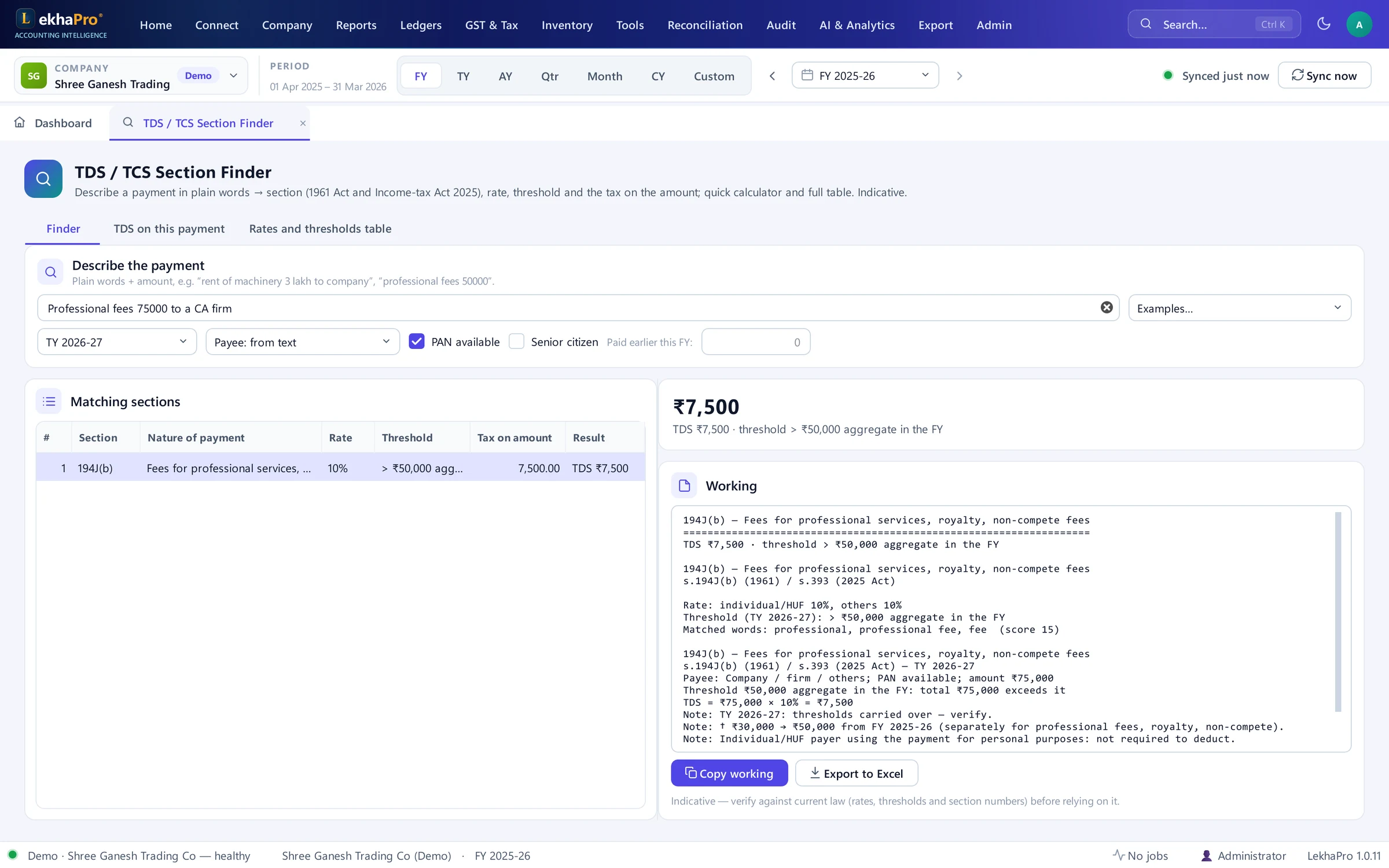
TDS Summary
TDS deducted (credits) and deposited (debits) by section and month with due dates.
TDS Register
Every TDS deduction with deductee (party / expense ledger), section and gross amount.
TDS Section Mapping — Income-tax Act 2025
Maps TDS/TCS deductions in the books to the Income-tax Act 2025 provisions (s.392 / s.393 / s.394) with the table serial and payment code, and the return form (138 / 140 / 143 / 144). Each row also shows the Act that governs it by date (1961 Act before 1-Apr-2026). Advisory.
TDS Interest u/s 201(1A) & Late Fee
Interest at 1.5% per month (or part) for late deposit of TDS deducted, FIFO matching deposits against monthly deductions.
GST Reconciliation (Books vs Portal)
Invoice-level matching of purchase/sales vouchers with GSTR-2B / 2A / GSTR-1.
Depreciation as per Income-tax Act (blocks)
Block-of-assets WDV schedule (ITR Schedule DEP rows) with half rate for < 180 days, additional depreciation and s.50 STCG / STCL.
GST Supplier-wise Reconciliation
Per-supplier matched / mismatched / missing documents and ITC at risk.
Form 3CD Clause 18 — Depreciation
Block-wise depreciation allowable with additions (date put to use, ≥/< 180 days) and deletions for the tax audit report.
GSTR-2B ITC Breakdown
Section-wise 2B totals and the net claimable ITC (credit notes, blocked and IMS-rejected).
GST Reconciliation Ladder
Exact → strong → probable → party-total ladder with mismatch and validation buckets (Books / Portal / Excess).
GST Reconciliation Period Matrix
Period × status matrix of documents and tax (books vs portal).
IMS Worksheet
Invoice Management System actions (accept / reject / pending), deemed acceptance and suggested actions.
Supplier Filing Risk (GSTR-1 / 3B)
Suppliers who have not filed GSTR-1 or GSTR-3B per GSTR-2A — ITC on their invoices is at risk.
GSTR-2A vs GSTR-2B
Documents reported after the 2B cut-off (in 2A, not yet in 2B) and value differences.
GST Supplier Follow-ups
Documents each supplier must report or correct, with the ask and ITC at risk (source for follow-up letters).
ITC Risk Register
Purchase credits at risk: not in GSTR-2B, supplier not filed / GSTIN cancelled, blocked u/s 17(5), Rule 37 (unpaid 180 days), time-barred u/s 16(4). Reviewer decisions persist.
Salary Tax — Old vs New Regime
Per-employee tax under both regimes, beneficial regime, opted liability and TDS u/s 192 balance.
GSTR-1 — Portal / Offline Tool file
GSTR-1 JSON sections with portal validation
GSTR-3B — Portal JSON (books-based)
HSN Summary — Table 12 (B2B/B2C portal format)
GSTR-9 Annual Return & 9C worksheet
E-invoice bulk batch (IRP v1.1)
E-way bill bulk batch (NIC)
ITC-04 — Job-work goods
HSN / SAC validation (items & lines)
Checks item-master and inventory-line HSN codes against the CBIC HSN/SAC catalogue
TDS Form 26Q — quarterly statement
TDS Form 24Q — salary statement
TCS Form 27EQ — quarterly statement
Tax collected at source (s.206C(1) / (1F) / (1H)) per collectee for the quarter: collectee code, PAN, amount received, rate, TCS and deposit — Form 27EQ (Form 143 under the Income-tax Act 2025).
Form 3CA / 3CB — Tax audit report (s.44AB)
Auditor's report under Rule 6G (3CA if audited under another law, else 3CB) — Word / PDF draft
Form 3CD — Tax audit clause data
ITR Part A-BS / Part A-P&L
CARO 2020 checklist
AOC-4 / Schedule III (MCA)
MSME Form-1 — dues to micro/small suppliers
Statutory compliance calendar
Inventory 23
Stock Summary
Item-wise opening, inward, outward and closing quantity and value (weighted average).
Item Ledger (Stock Item Vouchers)
Movements of one stock item with running quantity.
Stock Ageing (FIFO)
Closing stock split by age of inward lots (FIFO): 0-30, 31-60, 61-90, 91-180, >180 days.
Stock Movement Analysis
Fast / slow / non-moving classification by days since last outward movement and turnover.
Slow / Non-moving Stock
Items in stock with no outward movement for N days.
Dead Stock
Items in stock with no sale in the last N days (default 180).
Stock Below Reorder Level
Items whose stock on hand at period end is below the reorder level, with shortfall, average daily sale and suggested order quantity (falls back to days-of-cover when no reorder levels).
Negative Stock
Items whose running quantity went below zero, with first date and lowest balance.
Item-wise Gross Profit
Sales value vs cost (weighted-average) and GP% by item, item group, customer or invoice; flags sales below cost.
Top Selling Items
Items ranked by sales value with share and cumulative %.
Sales & Returns (Net) — Item-wise
Item-wise sales and sales returns (credit notes) quantity and value, net and return %.
Godown-wise Stock
Closing quantity by godown / location.
Batch & Expiry Stock
Batch-wise closing quantity with expiry: near-expiry (≤ N days), expired, and value at risk (only when batch / expiry data exists).
Stock & Sales Statement
Quarterly item panels: opening, purchases, sales and closing quantity/value (bank stock statement).
Purchase Rate History
Item-wise purchase rates over time: last, min, max, average and supplier of the last purchase.
Discount Analysis
Discount given (or received) by item, party or item group: bills, quantity, gross value, discount and discount % — from line discounts, else discount ledgers in the invoices.
Free Goods Issued
Free / scheme quantity given with invoices: zero-value lines, or quantity above the billed value (qty × rate exceeds the line amount) — valued at the average billed rate.
Purchase Planner (Stock Cover / Stock-out Forecast)
Days of cover and forecast stock-out date per item from the average daily sale, with a suggested order quantity (cover days, reorder level, minimum order qty) and estimated PO value.
Pending Purchase / Sales Orders
Open order lines as on the period end: ordered vs received / delivered (FIFO by party + item), balance, due date, value and status (from order vouchers).
Batch-wise Stock Valuation
Closing stock by godown, item and batch with expiry, cost (weighted average) and sale value at the last selling rate.
Expiry Register (Buckets)
Batches in stock by time to expiry: Expired, ≤3 months, 3-6, 6-12 and > 12 months, with godown, quantity and value at cost.
Inventory Ageing by Group / HSN / Vendor
FIFO ageing of closing stock rolled up by item group, HSN or supplier of the inward lot, with idle days.
Stock by Stage (RM / WIP / FG)
Opening, inward, outward and closing stock by stage — raw material, WIP, semi-finished, finished, stores & spares, packing, traded — from stock-group names (overridable).
Management & Analytics 37
Dashboard KPIs
Headline KPIs for the period with prior-period comparison (used by the dashboard).
Executive Summary
One-page narrative summary of performance, position and alerts for the period.
Daily Briefing
Activity on the last day of the period (or latest data day): sales, receipts, payments, cash position and bills falling due.
MIS KPI Pack
Twelve standard KPIs with formulas: revenue, EBIT, EBITDA, cash, NWC, GWC, DSO, DSI, DPO, CCC, ROE, ROCE — current vs previous.
MIS P&L (staged)
Management P&L: Net Sales → Gross Profit → PBIDT → profit after interest before depreciation → Net Profit, expenses grouped Manufacturing / Personnel / Admin / Selling; Current month, previous month, variance, YTD and previous YTD.
Receipts & Payments (MIS Cash Flow)
Operational cash statement: opening cash & bank, inflows (collections, other receipts, loans, capital), outflows by head (salary, statutory dues, creditors, advances, loans, finance charges, routine expenses) and the closing balance broken up into cash in hand and each bank.
Break-even Analysis
Cost-volume-profit: variable vs fixed costs, contribution, P/V ratio, break-even sales and margin of safety, with a monthly table.
Monthly Trend
Sales, purchases, expenses, receipts and payments per month with chart.
Ratio Analysis
Liquidity, leverage, profitability and efficiency ratios vs previous period ('n/a' for zero denominators).
Top Customers
Customers by sales with share, Pareto class and concentration (HHI).
Top Suppliers
Suppliers by purchases with share, Pareto class and concentration (HHI).
Sales / Purchase Analysis
Taxable sales (or purchases), net of returns, by party, item, item group, state, month, day or weekday.
Area-wise Sales
Sales by state, city or party ledger group: customers, invoices, taxable value, tax, invoice value and share.
Party-wise Sales / Purchases
Party-wise bills, quantity, taxable value, tax, invoice value, returns (credit / debit notes), net and share; optional area filter.
Concentration Risk (Pareto)
Every customer, item or vendor ranked by value with share, cumulative % (Pareto), ABC class and the Herfindahl-Hirschman concentration index.
Inactive Customers
Customers with no sale for more than N days before period end, with last sale and balance.
Customer-wise Gross Profit
Revenue, cost of goods sold (weighted-average item cost), gross profit and margin % by customer.
Expense Analysis
Expenses by ledger with share of total, monthly average and month-on-month change.
Revenue Leaks
One roll-up of money left on the table: sales below cost, unbilled delivery challans, unapplied (on-account) receipts and overdue interest not charged — each group drills to its source report.
Year-on-Year Growth
Key figures for the period vs the same period last year, with growth %.
Working Capital
Current assets and liabilities at period end vs previous, net working capital and cash conversion cycle (DSO + DIO − DPO).
Budget vs Actual
Actual P&L by ledger/group against the budget stored in settings (budget:<company_id> = {ledger_or_group: annual amount}).
Budget vs Actual — Monthly
Budget (LekhaPro Budgeting versions) vs actual by ledger / group and month with variance and %.
Rolling Forecast
Actuals to date plus budget / trend for the remaining months: full-year outlook vs budget.
Monthly Depreciation (MIS)
Schedule II depreciation per asset class per month for monthly MIS / management accounts.
Multi-Year Summary
Key performance and position KPIs side by side for up to 10 years (FY / TY), with CAGR, last-year growth and trend.
Revenue & Expense Forecast
Monthly forecast with an 80 % confidence band (Holt-Winters or WMA-trend, chosen by back-test).
Multi-Year Profit & Loss
Profit & Loss group-wise (or Schedule III) for up to 10 years with YoY growth and optional common-size % of revenue.
Cash-flow Forecast
Cash + bank projected from bill-wise receivables/payables, forecast business and recurring expenses.
Multi-Year Balance Sheet
Balance Sheet (Tally layout or Schedule III) as at each year end for up to 10 years, with YoY growth and optional common-size % of total assets.
Month-wise across Years
One row per month of the year and one column per year — sales, purchases, expenses, receipts, payments, net profit or GST output — for seasonal comparison (heatmap).
Ledger across Years
One ledger's opening, debit, credit and closing balance for every year.
Group across Years
One account group (all ledgers under it) — opening, debit, credit and closing per year.
Top Parties across Years
Top customers or suppliers for every year with share, rank change and CAGR (bar race).
Top Items across Years
Top stock items by sales (or purchases) value for every year with share, rank change and CAGR (bar race).
Ratios across Years
Liquidity, leverage, profitability and efficiency ratios for every year with trend arrows.
Multi-company Rollup
Headline figures for several remembered companies side by side (param: company ids, comma separated; blank = all synced companies).
Audit & Controls 33
Month-end / Year-end Readiness
Close checklist: TB tallies, unbalanced vouchers, suspense nil, negative cash/stock, missing narrations, duplicates, unreconciled bills, depreciation and GST/TDS postings.
Duplicate Vouchers
Same voucher type + number, or same party + amount + date (possible double entry).
Year-end Readiness
Automated year-end close checklist with status and evidence.
Round-figure Entries
Entries in exact multiples of ₹1,000 / ₹10,000 above a threshold (often estimates or manual plugs).
Cash Payments > ₹10,000 (s.40A(3)) & Receipts ≥ ₹2 lakh (s.269ST)
Cash payments to a person exceeding ₹10,000 in a day (disallowable u/s 40A(3)) and cash receipts of ₹2,00,000 or more from a person in a day (s.269ST).
Sunday / Holiday Entries
Vouchers dated on Sundays or on listed holidays.
FAR vs GL Reconciliation
Net block per the Fixed Asset Register against the general-ledger balance of each Fixed Assets ledger.
Missing Narration
Vouchers without narration.
CARO 2020 & Audit Report Status
CARO 2020 questionnaire: applicability, answers, book-based suggestions with evidence, blockers.
Back-dated Entries
Vouchers entered / altered long after their voucher date (needs entry date from the source).
Unusual Journal Entries
Journal vouchers touching cash, bank, sales or purchase ledgers (normally routed through dedicated voucher types).
Audit Differences (SA 450)
Adjusted and unadjusted audit differences with profit / balance-sheet effect vs materiality.
Audit Observations Register
Observations / management-letter points with risk, status, owner and management response.
Sales Below Cost
Sales invoice lines where the selling rate is below the weighted-average cost of the item on the sale date (loss-making sales, under-invoicing or wrong rates).
Audit Time — Budget vs Actual
Budgeted vs actual hours per audit cycle and team member, with checklist progress.
Trial Balance by Audit Cycle
The trial balance split into 15 audit cycles (one click); Σ cycles = TB.
Trial Balance — Custom Grouping
Trial balance re-grouped by a user-defined audit / notes / report grouping scheme (overlay — the source chart of accounts is untouched), with group subtotals and an Unassigned bucket.
Grouping Coverage
Ledgers not assigned to any group, or matched by rules pointing to different groups, for each audit / notes / report grouping scheme.
Large / Outlier Transactions
Top N vouchers by value plus statistical outliers (z-score above threshold within voucher type).
Benford's Law Test
First-digit distribution of entry amounts vs Benford's law with chi-square and MAD conformity.
Negative Cash Balance Days
Days on which a cash ledger's running balance was negative (cash cannot go below zero).
Anomaly Candidates (ML)
Vouchers ranked by an IsolationForest model plus robust z-scores and control signals — indicators for review, not proof.
Negative / Wrong-side Ledger Balances
Ledgers whose closing balance is on the opposite side to their nature: debtors in credit, creditors in debit, negative cash, expenses in credit, income in debit, etc.
Missing Monthly Expense Bookings
Recurring expense heads (rent, salary, electricity …) booked in most months of the FY but missing in some — possible unbooked expenses / missing provisions.
Suspense & Unclassified Balances
Balances in Suspense A/c and auto-created / unclassified ledgers that must be cleared before finalisation.
Exception Vouchers (Memo / Optional / Post-dated / Cancelled / Reversing)
Vouchers that do not affect the books (cancelled, optional, memorandum, reversing journals) or are dated in the future / flagged post-dated — review before finalisation.
Audit Sampling
SA 530 audit sampling of vouchers / ledger entries selected by client-specific conditions: random, systematic, monetary-unit (MUS), top-N or stratified, plus key items. Reproducible by seed; conditions can be saved as rules.
Exception Library — Summary
Rule-driven exception testing per P&L / Balance-Sheet head: every rule of the library with hit count and value, grouped Area → Head; drill into a rule for the hit list.
Exception Detail
Hit list of one Exception Library rule with its assertion and parameters; optional ad-hoc parameter overrides (e.g. threshold=5000; days=15).
Exception Rule Catalogue
Every rule of the Exception Library with head, assertion, severity, default / company parameters and enabled state.
Opening Balance Check (PY Closing vs CY Opening)
Every balance-sheet ledger's previous-year closing against the current-year opening, the retained earnings (P&L A/c) carry-forward and closing stock, plus source-reported FY openings where present.
Fixed Assets — Physical Verification (CARO 3(i)(b))
Asset-wise physical verification status from the Fixed Asset Register: tag, location, custodian, last PV date, overdue / not verified, discrepancies and the CARO 2020 cl. 3(i)(b) note.
Income-tax Provision Reconciliation
Per assessment year: provision for tax vs advance tax, TDS / TCS receivable and self-assessment tax → net payable / (refund), with open / closed status and whether a closing entry is due.
Data Quality 6
Combined Company - Seams & Discrepancies
For a Combined Company: where the linked companies' books differ (seams, gaps, entries outside a company's period, copies, opening differences). Display only - every year shows its own books.
Data Coverage
Vouchers, entries and value per month by voucher type, with gaps (months / long runs of days without any voucher).
Import Issues
Warnings and errors recorded during import / sync.
Source Control Totals
Control totals reported by the source at each import vs values computed from the warehouse, and source-reported ledger closing balances vs computed closings.
Unbalanced Vouchers
Vouchers whose debit and credit lines do not net to zero.
Export Agreement Check (Screen vs PDF vs Excel)
Exports a report to PDF and Excel in a temp folder, reads the files back and compares every total (and line, for short reports) with the on-screen figures.
Integrations
Works with the books you already keep
No migration. Your source books are never changed unless you approve a posting to Tally.
TallyPrime / Tally.ERP 9
Live or data folderReads a running Tally, or the company folder with Tally closed. Posts back only vouchers you approve after a preview.
BUSY
DirectReads a copy of BUSY data files: masters, vouchers and inventory.
MARG ERP
DirectReads the MARG data folder: masters, vouchers and stock.
EasySol
DirectReads accounting and inventory data from SQL Server or Access.
Excel / CSV / ODS / XML / JSON
File importTrial balance, day book or ledger export. Columns are mapped automatically and the mapping is saved.
Trial Balance import
Two-yearFor any other software: load current and previous year and go straight to reports.
Product names belong to their owners and are used only to say what LekhaPro can read.
Screens
Real screens, sample data
Click the screen in the laptop to see it in full size.
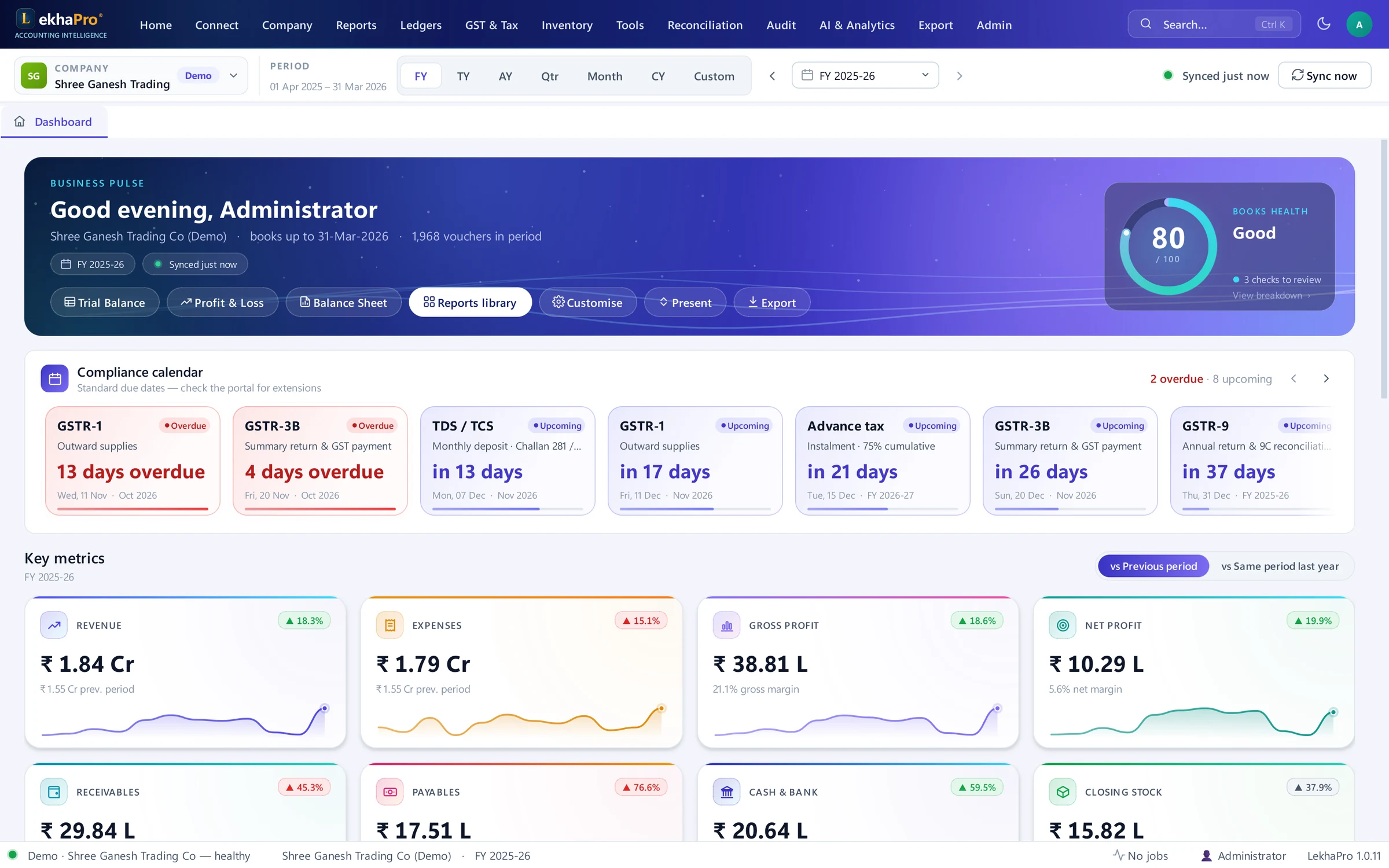
DashboardLekhaPro dashboard with business pulse, compliance calendar and key metrics
Questions
Schedule III, GSTR-2B, BUSY, MARG and audit
How do I prepare Schedule III statements from Tally?
Connect the Tally company, choose the year and open the Schedule III Balance Sheet or Profit and Loss. LekhaPro maps ledgers to Schedule III lines, adds previous-year figures, notes, ageing and ratios, and lets you change the mapping and layout. Export to PDF, Word or Excel after your review.
Statements follow Division I of Schedule III. Year-end entries are kept beside the books.
How does GSTR-2B reconciliation work?
Import the GSTR-2B file downloaded from the GST portal as JSON, Excel or ZIP. LekhaPro compares it with purchases in the books by GSTIN, invoice number, date and value. It lists matched, different, missing and duplicate invoices, finds numbers typed differently, and shows the ITC at risk.
It also works for GSTR-2A and for filed GSTR-1 against sales, with an IMS worksheet and supplier follow-up letters.
Can it read BUSY, MARG and EasySol as well as Tally?
Yes. LekhaPro reads TallyPrime and Tally.ERP 9, BUSY, MARG ERP and EasySol directly, without exporting first. Any other software can come in through Excel, CSV, ODS, XML or JSON files, or a two-year trial balance. All of them use the same report library, so your working method stays the same.
Tally can be read live or from its data folder with Tally closed. Product names belong to their owners and are used only to say what LekhaPro can read.
Does LekhaPro file GST returns by itself?
No. LekhaPro makes files from the books and checks them before export: GSTR-1 JSON and Offline Tool Excel, GSTR-3B JSON, e-invoice and e-way bill bulk files and more. You review each file, upload it to the portal and file the return there with your own login.
Can it read a Tally company locked with TallyVault?
Only with the client's help. A TallyVault company is encrypted, and LekhaPro does not guess or break its password. The client can open it in Tally and let LekhaPro read it live, or remove the vault in Tally. Either way, the password is typed only into Tally itself.
Which audit checks does LekhaPro run?
LekhaPro runs an Exception Library of 128 rules on the books, with limits that you can tune for each company. Checks cover cash limits under sections 40A(3) and 269ST, duplicates, back-dated entries and Benford analysis. Sampling, a CARO 2020 builder and an anomaly ranking are included. Results need your review.
What are the CA tools?
There are 21 CA tools and 4 document tools in the desktop app. They include a PDF toolkit and editor, interest, late-fee and capital gains calculators, 26AS and AIS matching, registers for notices, UDIN and DSC, and certificates and letters. The file-based tools work only on the files that you choose.
See it on your own client's books
Ask for a personalised demo for your practice or finance team.